Electronics, Audio, and Video All Audio, Video, Alarms, and all other electronics

Nexus 7 installed in dash! Pics enclosed

Thread Tools
 
Search this Thread
 
Old Apr 28, 2015 | 09:17 PM
  #1  
Dubz's Avatar
Thread Starter
New Member
 
Joined: 05-16-14
Posts: 99
Likes: 0
From: Dixon, IL
Cool Nexus 7 installed in dash! Pics enclosed

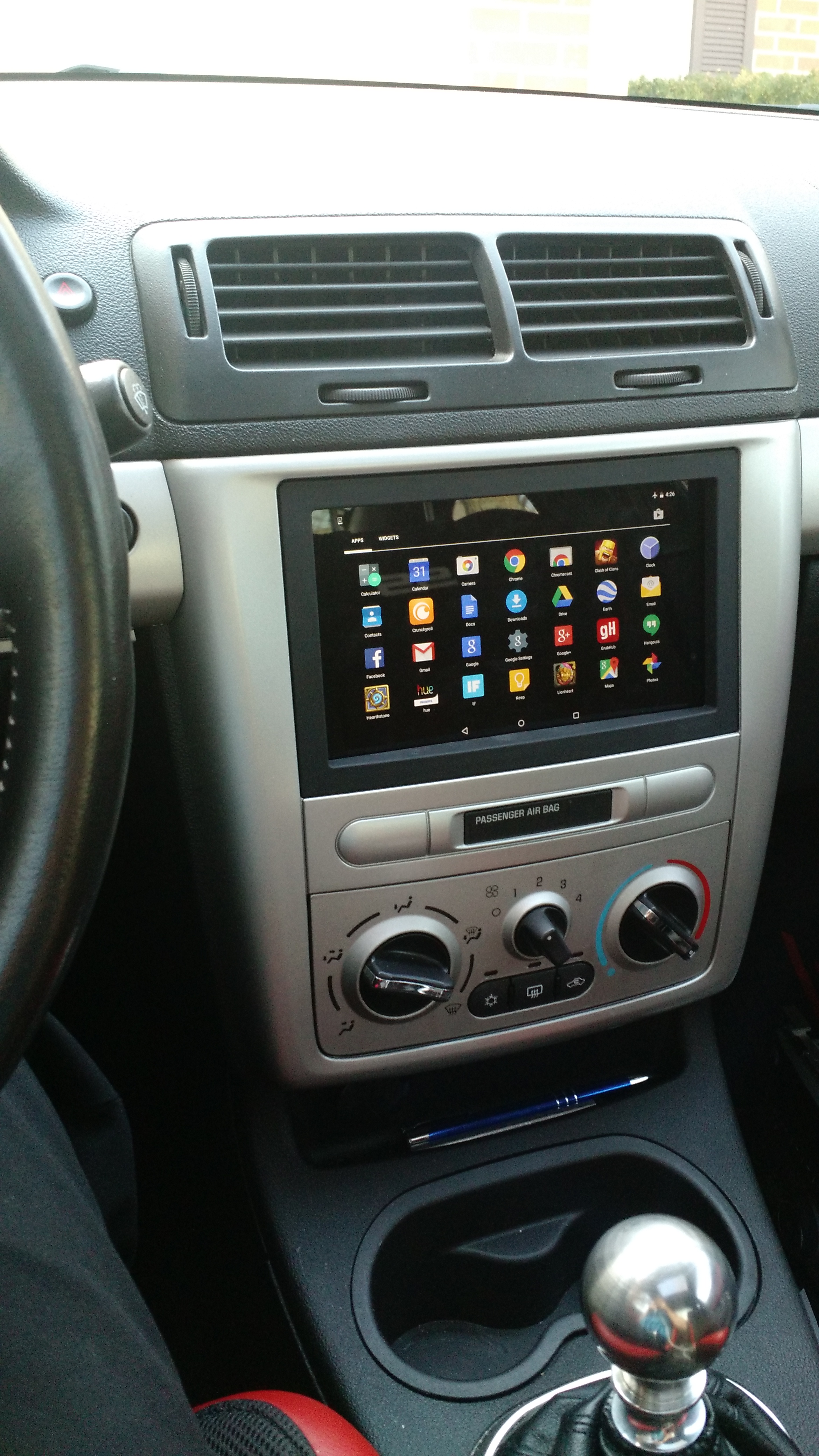
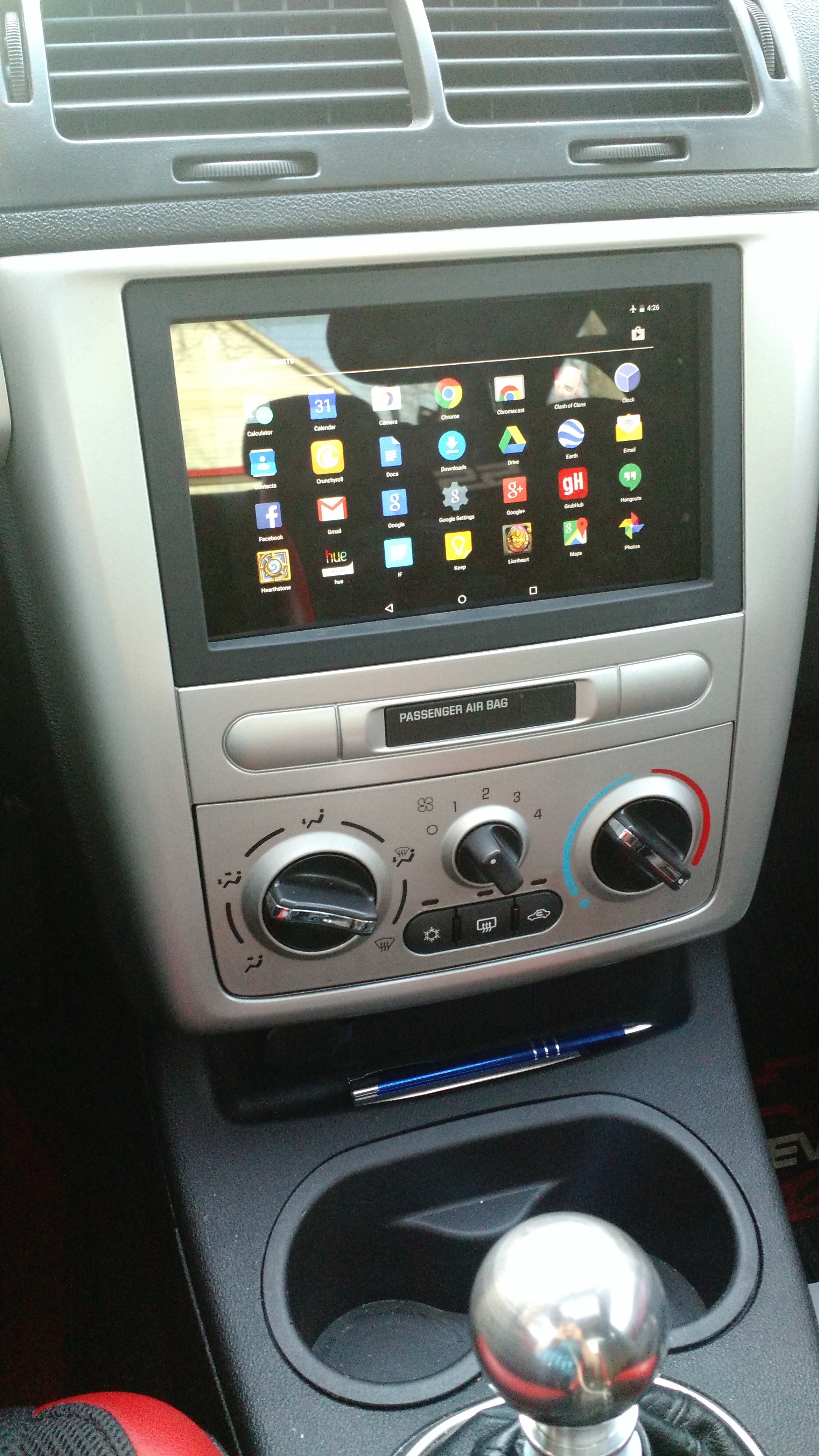
Just tossing this up here. Don't know if anyone else has posted pictures like this... but from a quick search on the forums I didn't see any. So at any rate, here it is! The first picture is an up close picture of the tablet in the dash. The second picture is my view from roughly where my eyes are at a driving stance.

Enjoy!

Name:  exgzc8p.jpg
Views: 160
Size:  2.38 MB

Name:  3Yej4L5.jpg
Views: 135
Size:  2.94 MB
Reply
Old Apr 28, 2015 | 09:20 PM
  #2  
07blackg5's Avatar
Slobodan Milošević
iTrader: (8)
 
Joined: 11-05-07
Posts: 5,959
Likes: 215
From: Serbia
looks good, but how do you control the power/side buttons
Reply
Old Apr 28, 2015 | 09:24 PM
  #3  
yellowsupercharged06's Avatar
Senior Member
iTrader: (3)
 
Joined: 03-15-10
Posts: 5,101
Likes: 29
From: Long Island NY
Pretty sweeet. Have a how to? Any more details on how it works ?
Reply
Old Apr 28, 2015 | 09:37 PM
  #4  
Dubz's Avatar
Thread Starter
New Member
 
Joined: 05-16-14
Posts: 99
Likes: 0
From: Dixon, IL
Originally Posted by 07blackg5
looks good, but how do you control the power/side buttons
You do not need to control the side/power buttons at all. The job is not done yet and at the end there will be in equalizer in place of the "passenger air bag" slot. I'm going to drill out a square right there where that module is and fit the equalizer in there. The equalizer will have physical knobs for Volume, Sub Volume, and all of the standard equalizer adjustments.

The tablet is going to be configured in a way to watch for an external power source. When the external power source is present the tablet is going to stay on with the screen on at all times. When the tablet sees that the external power source disappears, it will go into a deep sleep even turning off notifications and all other power draining things that happen while a tablet is usually saving power.

Other than that the tablet is literally built into the dash. It is still able to be removed by taking off two pieces of the dash and 4 screws.
Reply
Old Apr 28, 2015 | 09:42 PM
  #5  
Dubz's Avatar
Thread Starter
New Member
 
Joined: 05-16-14
Posts: 99
Likes: 0
From: Dixon, IL
Originally Posted by yellowsupercharged06
Pretty sweeet. Have a how to? Any more details on how it works ?
I don't have a how-to yet because the project is not complete. This is the first day of installation and I work full-time and I'm a full-time college student so I have a hard time finding time for fun projects. The whole project is going to include the Nexus 7 install, front and rear speaker replacements, two 12" Infiniti 120.9w kappa subs, two 350 watt mono amplifiers, and a 4 channel amplifier for the front/rear speaker.

I can give some details for sure on how it works if you want. I have everything needed to set it up, but I haven't done everything yet. I didn't want to put it all out on the board before I knew that it worked!

The goal is to have the tablet do everything that the stock headunit does including steering wheel controls!
Reply
Old May 2, 2015 | 08:22 PM
  #6  
intel's Avatar
Member
iTrader: (1)
 
Joined: 05-06-09
Posts: 328
Likes: 0
From: Florida
Looks really good, I did this a while back and relocated my hvac, but your install is way cleaner. I eventually want to run dual 7" tablets though just for the helluva it.
Reply
Old May 2, 2015 | 08:36 PM
  #7  
Snail_SS's Avatar
Moderator
Platinum Member
Moderator
iTrader: (3)
 
Joined: 04-18-14
Posts: 16,421
Likes: 603
From: El Paso, TX
That looks super clean im down to get a how too
Reply
Old May 2, 2015 | 09:45 PM
  #8  
royce777's Avatar
Senior Member
iTrader: (29)
 
Joined: 06-28-08
Posts: 9,418
Likes: 222
From: Pittsburgh, PA
i like it. i just wouldnt be able to give up steering wheel controls for this. I love my steering wheel controls
Reply
Old May 2, 2015 | 09:46 PM
  #9  
Snail_SS's Avatar
Moderator
Platinum Member
Moderator
iTrader: (3)
 
Joined: 04-18-14
Posts: 16,421
Likes: 603
From: El Paso, TX
Haha i forgot about that ^
Reply
Old May 5, 2015 | 10:38 AM
  #10  
Dubz's Avatar
Thread Starter
New Member
 
Joined: 05-16-14
Posts: 99
Likes: 0
From: Dixon, IL
Originally Posted by royce777
i like it. i just wouldnt be able to give up steering wheel controls for this. I love my steering wheel controls
I am working around steering wheel controls with this:

Joycon EXR Steering Wheel Interface

It basically takes your buttons from your steering wheel and turns them into a keyboard and the tablet is the computer. You can customize what every button does on your steering wheel to things on the tablet. For example, you can customize the next/previous track to instead go to the next song on pandora/spotify.
Reply
Old May 5, 2015 | 10:45 AM
  #11  
Dipped_Cobalt's Avatar
Senior Member
 
Joined: 04-23-12
Posts: 2,212
Likes: 39
From: Texas
nice! more info as its available. this is awesome.
Reply
Old May 5, 2015 | 11:06 AM
  #12  
riceburner's Avatar
Super Moderator
Platinum Member
iTrader: (66)
 
Joined: 05-18-11
Posts: 39,564
Likes: 87
From: West Chicago, IL
Really cool, x2 on wanting more.info as i would love to do this with my tablet.

Weight reduction
Reply
Old May 5, 2015 | 11:20 AM
  #13  
GBRunner24's Avatar
Junior Member
iTrader: (1)
 
Joined: 01-31-14
Posts: 450
Likes: 10
From: Grand Rapids, MI
Looks great! Interested in a how to as well. Are you using a 2012 or 2013 Nexus?
Reply
Old May 6, 2015 | 10:00 AM
  #14  
Dubz's Avatar
Thread Starter
New Member
 
Joined: 05-16-14
Posts: 99
Likes: 0
From: Dixon, IL
Originally Posted by GBRunner24
Looks great! Interested in a how to as well. Are you using a 2012 or 2013 Nexus?
It's a 2013 Nexus 7. You can use either the 2012 model or the 2013 model, but the 2013 model has better specs. If you use the 2013 model, you have to remove the back of the tablet for it to fit inside the double din holder.

Sorry I don't have a how-to yet. Full-time college student and I have a full-time job. I bought all of the stuff to redo the stereo 2 weeks ago and I still don't have it installed because I don't have enough time .

I will try and get it done soon so I can share it with everyone.
Reply
Old Jul 6, 2015 | 04:02 PM
  #15  
sc4door's Avatar
Junior Member
iTrader: (8)
 
Joined: 02-27-13
Posts: 486
Likes: 19
From: Ohio
I've been wanting to do this for awhile and now I want to even more. That looks awesome. Radios aren't my thing so I agree that a how to would be nice. What I'd really love is to have a tablet mounted there as a head unit that I can also use to plug my HPT cable in for logs. And also, does anyone know if it's possible to use the tablet as a radio, like connect to the antenna and pick up FM signal?
Reply
Old Jul 15, 2015 | 02:53 PM
  #16  
:ninja:'s Avatar
New Member
 
Joined: 12-31-12
Posts: 108
Likes: 0
From: Florida
Interested if u plan on selling the kit for these
Reply
Old Jul 22, 2015 | 07:35 PM
  #17  
GoBlue96's Avatar
New Member
 
Joined: 09-25-08
Posts: 11
Likes: 0
From: Michigan
Do you have a solution for a cellular connection or can you just listen to whatever is preloaded? Can you connect via Bluetooth?
Reply
Old Jul 25, 2015 | 09:23 AM
  #18  
Squints's Avatar
Senior Member
iTrader: (4)
 
Joined: 09-26-12
Posts: 1,487
Likes: 5
From: Baytown, Tx
How are you handling your media? Hidden hard drive behind the mounted tablet? Usb extender to the glove compartment? Wi-Fi broadcasting hard drive that connects to the tablet?
Reply
Old Jul 29, 2015 | 12:07 PM
  #19  
Crav3's Avatar
Senior Member
iTrader: (1)
 
Joined: 04-25-12
Posts: 1,862
Likes: 5
From: Laredo
This would be an awesome thing to do. But wouldnt know how to save all my music in one tablet lol even with spotify
Reply
Old Jul 29, 2015 | 01:39 PM
  #20  
Dipped_Cobalt's Avatar
Senior Member
 
Joined: 04-23-12
Posts: 2,212
Likes: 39
From: Texas
and it dies....
Reply
Old Jul 29, 2015 | 07:32 PM
  #21  
Squints's Avatar
Senior Member
iTrader: (4)
 
Joined: 09-26-12
Posts: 1,487
Likes: 5
From: Baytown, Tx
Originally Posted by Crav3
This would be an awesome thing to do. But wouldnt know how to save all my music in one tablet lol even with spotify
I have a hard drive that you can connect to via Wi-Fi. The way it works the hard drive broadcasts a Wi-Fi signal that the tablet connects to. You can load movies, music, or pictures. I believe mine is 500 gb and I haven't had an issue with it working in the car when my daughter is watching movies on her tablet
Reply
Old Jul 29, 2015 | 07:34 PM
  #22  
slapbetcommissioner's Avatar
Senior Member
iTrader: (3)
 
Joined: 09-15-09
Posts: 4,140
Likes: 57
From: Winnipeg
It would be pretty badass if that could run hpt all integrated into the dash.
Reply
Old Jul 29, 2015 | 07:36 PM
  #23  
Squints's Avatar
Senior Member
iTrader: (4)
 
Joined: 09-26-12
Posts: 1,487
Likes: 5
From: Baytown, Tx
Might be able to. I mean they have an HPT app don't they?
Reply
Old Jul 30, 2015 | 10:02 AM
  #24  
riceburner's Avatar
Super Moderator
Platinum Member
iTrader: (66)
 
Joined: 05-18-11
Posts: 39,564
Likes: 87
From: West Chicago, IL
Samsung Galaxy Tab in a 2010 VW Golf (with big pictures!)
Reply
Old Jul 31, 2015 | 02:08 AM
  #25  
Crav3's Avatar
Senior Member
iTrader: (1)
 
Joined: 04-25-12
Posts: 1,862
Likes: 5
From: Laredo
Well when you put it that way, i like the idea of the HDD that broadcasts WiFi.

How did you mount the tablet op?
Reply


All times are GMT -4. The time now is 07:40 AM.