


How to Search


Thread Starter
Original Hayden Fanatic
Platinum Member
Joined: 05-06-06
Posts: 33,169
Likes: 1
From: Dayton, O HI O
How to Search
With all the repeat threads lately I decided to type up a more helpful howto on searching...Im not quite sure where to put it for members to view easily without having to search(lol)
But this is what ive come up with:
I just thought I'd throw that out there...
But this is what ive come up with:
Originally Posted by How to search
Being new to the forums can be overwhelming & the search function can be very difficult to find information at first glance, but here are some tips to get better more accurate results.
When you use the “Search” function at the top of the page and type in your request you will get 50000 threads that have nothing to do with nothing. This is because the forum defaults to searching for your key words in the entire thread.
So what is one to do, sift through 49995 uninformative threads? No, instead this is how to get some more accurate results.
Click Search: Advanced Search

This will bring you to this screen here:
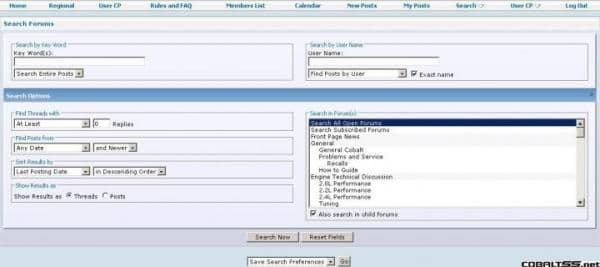
Now, there are lots of options available to you here to get the best results possible. Lets use as an example you are searching for: Turbo information on your 2.2 Cobalt.
Using the “regular” search method you will get about 1000 threads, now let’s use some of the Advanced Search features.
The two key options you want to change in the Advanced Search are:
1.) Change “Search Entire Posts” to “Search Titles Only” in the Keyword area.
2.) In the “Search in Forum(s)” option select “2.2L Performance”.
Now your screen should look like this:
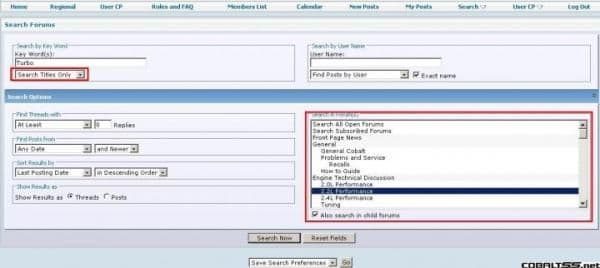
Click the “Search Now” button and you will find more topic specific results & hopefully you should find all the info you need.
You can also select multiple parts of the forum in the “Search in Forum(s)” section by holding down the Ctrl button on your keyboard and clicking the parts of the forum you want to search in the list.
When you use the “Search” function at the top of the page and type in your request you will get 50000 threads that have nothing to do with nothing. This is because the forum defaults to searching for your key words in the entire thread.
So what is one to do, sift through 49995 uninformative threads? No, instead this is how to get some more accurate results.
Click Search: Advanced Search
This will bring you to this screen here:
Now, there are lots of options available to you here to get the best results possible. Lets use as an example you are searching for: Turbo information on your 2.2 Cobalt.
Using the “regular” search method you will get about 1000 threads, now let’s use some of the Advanced Search features.
The two key options you want to change in the Advanced Search are:
1.) Change “Search Entire Posts” to “Search Titles Only” in the Keyword area.
2.) In the “Search in Forum(s)” option select “2.2L Performance”.
Now your screen should look like this:
Click the “Search Now” button and you will find more topic specific results & hopefully you should find all the info you need.
You can also select multiple parts of the forum in the “Search in Forum(s)” section by holding down the Ctrl button on your keyboard and clicking the parts of the forum you want to search in the list.

Thread
Thread Starter
Forum
Replies
Last Post
Delta coupe
Pictures & Videos
1
Sep 30, 2015 08:11 AM