
Pictures & Videos Your pictures, photoshops, and videos.

picture...

Thread Tools
 
Search this Thread
 
Old Dec 13, 2008 | 03:58 PM
  #1  
nightstalkercars's Avatar
Thread Starter
Junior Member
 
Joined: 11-20-07
Posts: 410
Likes: 0
From: buckhannon, WV
picture...

how do i make my picture full size in a post?
they come out in a small size when i post them
Reply
Old Dec 13, 2008 | 03:59 PM
  #2  
vB00STw's Avatar
Senior Member
 
Joined: 08-10-05
Posts: 1,548
Likes: 0
From: Long Island, NY
Are you hosting them on CSS.net?
Reply
Old Dec 13, 2008 | 04:00 PM
  #3  
greekss's Avatar
Junior Member
 
Joined: 07-26-06
Posts: 477
Likes: 0
From: Virginia
css.net>nightstalker
Reply
Old Dec 13, 2008 | 04:01 PM
  #4  
nightstalkercars's Avatar
Thread Starter
Junior Member
 
Joined: 11-20-07
Posts: 410
Likes: 0
From: buckhannon, WV
how do i do that?
sorry for being a noob

the way i have done them is just uploading them into gallery

Last edited by nightstalkercars; Dec 13, 2008 at 04:01 PM. Reason: Automerged Doublepost

Reply
Old Dec 13, 2008 | 04:02 PM
  #5  
NWAE Cobalt's Avatar
Senior Member
iTrader: (1)
 
Joined: 07-27-07
Posts: 17,332
Likes: 1
From: Puyallup, WA
put [ Img ] [ /IMG] around the pic url (without the spaces in them)
Reply
Old Dec 13, 2008 | 04:14 PM
  #6  
nightstalkercars's Avatar
Thread Starter
Junior Member
 
Joined: 11-20-07
Posts: 410
Likes: 0
From: buckhannon, WV
the pics have ccs.net on the bottom right hand corner just cant figure out to make it biger man
Reply
Old Dec 13, 2008 | 04:28 PM
  #7  
NWAE Cobalt's Avatar
Senior Member
iTrader: (1)
 
Joined: 07-27-07
Posts: 17,332
Likes: 1
From: Puyallup, WA
right click on pic and copy the address, take that and put the [ IMG ] [/IMG ] around it (without spaces) and it will be full size
Reply
Old Dec 13, 2008 | 05:41 PM
  #8  
nightstalkercars's Avatar
Thread Starter
Junior Member
 
Joined: 11-20-07
Posts: 410
Likes: 0
From: buckhannon, WV
still isnt work ing and i went and right click copy shortcut and then add and this is what is does

still small idk thanks for the help anyways
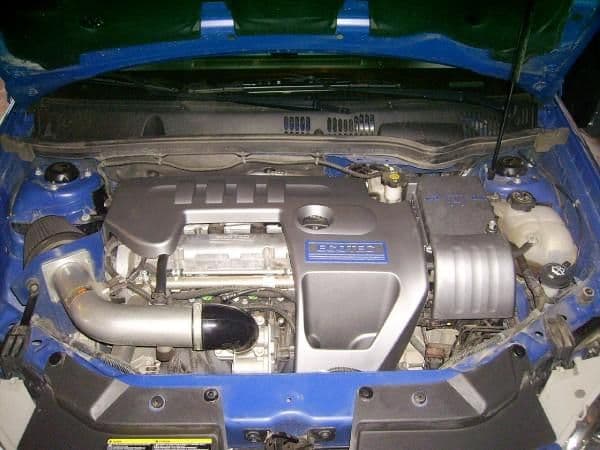


yes!!! i figured it out i was being a noob and wasnt making the picture large before i was trying to save the address so i got it now thats for the help

Last edited by nightstalkercars; Dec 13, 2008 at 05:41 PM. Reason: Automerged Doublepost
Reply
Old Dec 13, 2008 | 06:25 PM
  #9  
NWAE Cobalt's Avatar
Senior Member
iTrader: (1)
 
Joined: 07-27-07
Posts: 17,332
Likes: 1
From: Puyallup, WA
np man, looking pretty good!!! a little dirty though lol
Reply
Old Dec 13, 2008 | 06:35 PM
  #10  
nightstalkercars's Avatar
Thread Starter
Junior Member
 
Joined: 11-20-07
Posts: 410
Likes: 0
From: buckhannon, WV
ya a old picture i had
Reply
Old Dec 13, 2008 | 06:36 PM
  #11  
NWAE Cobalt's Avatar
Senior Member
iTrader: (1)
 
Joined: 07-27-07
Posts: 17,332
Likes: 1
From: Puyallup, WA
this one looks good! i would have gone a lil darker on the tint but it looks great
Reply
Old Dec 13, 2008 | 06:43 PM
  #12  
nightstalkercars's Avatar
Thread Starter
Junior Member
 
Joined: 11-20-07
Posts: 410
Likes: 0
From: buckhannon, WV
Originally Posted by NWAE Cobalt
this one looks good! i would have gone a lil darker on the tint but it looks great
first time i ever messed with this stuff i am thinking about redoing them darker just got to figure out a way to remove the tint with out hurting the tail lights
Reply
Old Dec 13, 2008 | 06:45 PM
  #13  
NWAE Cobalt's Avatar
Senior Member
iTrader: (1)
 
Joined: 07-27-07
Posts: 17,332
Likes: 1
From: Puyallup, WA
Originally Posted by nightstalkercars
first time i ever messed with this stuff i am thinking about redoing them darker just got to figure out a way to remove the tint with out hurting the tint
remove the tint without hurting the tint?? you mean without hurting the tail lights?
use paint thinner or acitone...i used to have tinted tails and did this...works great and makes them all perty and shiny again for you to start over on
Reply
Old Dec 13, 2008 | 06:47 PM
  #14  
nightstalkercars's Avatar
Thread Starter
Junior Member
 
Joined: 11-20-07
Posts: 410
Likes: 0
From: buckhannon, WV
Originally Posted by NWAE Cobalt
remove the tint without hurting the tint?? you mean without hurting the tail lights?
use paint thinner or acitone...i used to have tinted tails and did this...works great and makes them all perty and shiny again for you to start over on
fixed thanks for the info i might do this tomorrow because it gonna be around 50 degres tomorrow thank agian
Reply
Old Dec 13, 2008 | 06:55 PM
  #15  
NWAE Cobalt's Avatar
Senior Member
iTrader: (1)
 
Joined: 07-27-07
Posts: 17,332
Likes: 1
From: Puyallup, WA
Originally Posted by nightstalkercars
fixed thanks for the info i might do this tomorrow because it gonna be around 50 degres tomorrow thank agian
no prob, it does evap quickly, so just take the light off, pour some on, wipe/ scrub with a towel you dont want cause the paint transfers to the towel. do that till it looks clean then put some on a clean pc of towel and wipe it till it shines
Reply
Old Dec 13, 2008 | 06:59 PM
  #16  
nightstalkercars's Avatar
Thread Starter
Junior Member
 
Joined: 11-20-07
Posts: 410
Likes: 0
From: buckhannon, WV
sounds good man thanks agian oh and the stuff i am using is like um...r/c window tint cant remember what it is called but it work good thou cant seem to find the nightshade anywhere here were i live
Reply
Old Dec 13, 2008 | 07:00 PM
  #17  
NWAE Cobalt's Avatar
Senior Member
iTrader: (1)
 
Joined: 07-27-07
Posts: 17,332
Likes: 1
From: Puyallup, WA
Originally Posted by nightstalkercars
sounds good man thanks agian oh and the stuff i am using is like um...r/c window tint cant remember what it is called but it work good thou cant seem to find the nightshade anywhere here were i live
cool cool
Reply
Related Topics
Thread
Thread Starter
Forum
Replies
Last Post
Paxmillion
08-10 SS Turbocharged General Discussion
6
May 8, 2012 10:52 PM
dietztho000
2.0L LSJ Performance Tech
16
Aug 27, 2011 04:03 PM


All times are GMT -4. The time now is 01:59 PM.