


Easy photoshop please help


Thread Starter
Member
Joined: 03-14-07
Posts: 241
Likes: 0
From: Texas
Easy photoshop please help
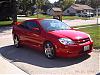
I would like to see the below car photoshoped just as it is. But with the bottom black and the top white. Any sorta black wheels put on the car with a polished lip. and if you're feeling froggy I plan on going with the RK sport hood (Ram air) so you could make the induction part black but the rest of the hood white
make sense? the photoshop doesn't have to look completely professional. Just need something. Ill rep ***** you too


make sense? the photoshop doesn't have to look completely professional. Just need something. Ill rep ***** you too
Thread Starter
Member
Joined: 03-14-07
Posts: 241
Likes: 0
From: Texas




Senior Member
Joined: 06-22-06
Posts: 2,540
Likes: 0
From: Misery, USA
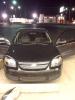
Okay, not the best since my photochop skills aren't nearly what I want them to be, but you get the idea:

luke kicked my ass in this...
luke kicked my ass in this...
Last edited by lucky_lellow06; Nov 7, 2007 at 11:32 PM. Reason: Automerged Doublepost


Senior Member
Joined: 06-22-06
Posts: 2,540
Likes: 0
From: Misery, USA

 You sure did better than me! Hell, you could probably give me a few pointers!! I've got a lot to learn as well, but you're beyond me right now.
New Member
Joined: 11-06-07
Posts: 7
Likes: 0
From: Oregon
One thing I did that cleaned it up a ton....I had the same problem as you around the edges still showing red. Assuming your new black and white colors are on new layers...select the original layer in the areas where the red is "glowing" then go to hue/saturation (I think that was it...I need ps in front of me) specify just the red channel...and darken in all the way. That, I believe, is what I did to get rid of the red around the edges.
New Member
Joined: 11-06-07
Posts: 7
Likes: 0
From: Oregon
<---is still a n00b with PS. I selected the top (selected, made a new layer from it then removed the color) and changed it white by using the channel mixed and selecting grayscale...then I forget which slider...same with the bottom...my problem was my selection was off...which is why I took the red out. I'm still having a hard time being able to achieve a good white.

Senior Member
Joined: 06-22-06
Posts: 2,540
Likes: 0
From: Misery, USA
One thing I did that cleaned it up a ton....I had the same problem as you around the edges still showing red. Assuming your new black and white colors are on new layers...select the original layer in the areas where the red is "glowing" then go to hue/saturation (I think that was it...I need ps in front of me) specify just the red channel...and darken in all the way. That, I believe, is what I did to get rid of the red around the edges.
<---is still a n00b with PS. I selected the top (selected, made a new layer from it then removed the color) and changed it white by using the channel mixed and selecting grayscale...then I forget which slider...same with the bottom...my problem was my selection was off...which is why I took the red out. I'm still having a hard time being able to achieve a good white.
Last edited by lucky_lellow06; Nov 8, 2007 at 02:06 PM. Reason: Automerged Doublepost

Thread
Thread Starter
Forum
Replies
Last Post