

2.0L LSJ Performance Tech 205hp Supercharged SS tuner version. 200 lb-ft of torque.

HPT - MAF Tuning

Thread Tools
 
Search this Thread
 
Old May 12, 2011 | 10:20 PM
  #1  
thebucky84's Avatar
Thread Starter
Senior Member
iTrader: (4)
 
Joined: 09-12-07
Posts: 988
Likes: 0
From: Florida
Question HPT - MAF Tuning

I was wondering if anybody knows the correct way to MAF tune? It will have to be without the wideband hook up to hpt. I wont be able to get HPT Pro anytime soon. I read this on the hpt site: "You need to plot the LTFTs against the MAF table using a histogram. Then just copy and paste special (multiply by %) the percentages into the tune. Flash and repeat.".. Is this a correct way of doing it? My VE table is great and just need to MAF tune. Any help would be great!
Reply
Old May 13, 2011 | 02:33 PM
  #2  
SCcobaltSS's Avatar
Senior Member
iTrader: (2)
 
Joined: 11-28-06
Posts: 4,085
Likes: 2
From: Phoenix
I have always done STFT+LTFT histo against the maf and it works fine.

Also you dont need pro to have your HPT log your WB.
Reply
Old May 13, 2011 | 05:17 PM
  #3  
thebucky84's Avatar
Thread Starter
Senior Member
iTrader: (4)
 
Joined: 09-12-07
Posts: 988
Likes: 0
From: Florida
ok so instead of just the LTFT against the maf put LTFT+STFT pid against it? How do you log your wb through hpt then? Is it that a/c switch mod or something?
Reply
Old May 13, 2011 | 05:26 PM
  #4  
SCcobaltSS's Avatar
Senior Member
iTrader: (2)
 
Joined: 11-28-06
Posts: 4,085
Likes: 2
From: Phoenix
Yes LTFT+STFT Trim error vs. maf freq.

If you do just the LTFT you are just going to have to do the STFT too..

And yes through the ac pressure signal wire. Mine works perfectly...
Reply
Old May 13, 2011 | 05:57 PM
  #5  
thebucky84's Avatar
Thread Starter
Senior Member
iTrader: (4)
 
Joined: 09-12-07
Posts: 988
Likes: 0
From: Florida
you have any kind of wiring diagram? Is it easy to do?
Reply
Old May 13, 2011 | 06:08 PM
  #6  
SCcobaltSS's Avatar
Senior Member
iTrader: (2)
 
Joined: 11-28-06
Posts: 4,085
Likes: 2
From: Phoenix
Originally Posted by thebucky84
you have any kind of wiring diagram? Is it easy to do?
Follow the HPT thread on it in the I4, I5.... There is a picture of what wire to splice into.
Reply
Old May 13, 2011 | 06:39 PM
  #7  
thebucky84's Avatar
Thread Starter
Senior Member
iTrader: (4)
 
Joined: 09-12-07
Posts: 988
Likes: 0
From: Florida
you have the link? i cant find it on there, even when i do a search lol
Reply
Old May 13, 2011 | 06:56 PM
  #8  
thebucky84's Avatar
Thread Starter
Senior Member
iTrader: (4)
 
Joined: 09-12-07
Posts: 988
Likes: 0
From: Florida
nvm found it
Reply
Old May 15, 2011 | 09:38 PM
  #9  
thebucky84's Avatar
Thread Starter
Senior Member
iTrader: (4)
 
Joined: 09-12-07
Posts: 988
Likes: 0
From: Florida
any know a good way to maf tune? I got my afr wired though the ac switch so i can log afr's now. Or at least point me in the right direction with a link or something. Thanks
Reply
Old May 15, 2011 | 09:44 PM
  #10  
05Slowline's Avatar
Banned
iTrader: (2)
 
Joined: 06-03-10
Posts: 6,918
Likes: 0
From: HBG/Hanover
cruise, maf error histo, copy, paste with multiply % - half, flash, repeat hand smooth when necessary
Reply
Old May 15, 2011 | 10:05 PM
  #11  
thebucky84's Avatar
Thread Starter
Senior Member
iTrader: (4)
 
Joined: 09-12-07
Posts: 988
Likes: 0
From: Florida
ok, thats what i've read. My buddy tunes a lot with hpt and told me something a bit different. Taking the difference from actual afr and commanded afr then multiply % to the maf
Reply
Old May 15, 2011 | 10:34 PM
  #12  
thebucky84's Avatar
Thread Starter
Senior Member
iTrader: (4)
 
Joined: 09-12-07
Posts: 988
Likes: 0
From: Florida
anyone know the function string for AFR error?
Reply
Old May 15, 2011 | 11:27 PM
  #13  
05Slowline's Avatar
Banned
iTrader: (2)
 
Joined: 06-03-10
Posts: 6,918
Likes: 0
From: HBG/Hanover
100*([sens.120]-[sens.121])/[sens.121]
Reply
Old May 15, 2011 | 11:56 PM
  #14  
thebucky84's Avatar
Thread Starter
Senior Member
iTrader: (4)
 
Joined: 09-12-07
Posts: 988
Likes: 0
From: Florida
yeah i found it on hpt... (actual-Theoretical)/(Theoretical)
Reply
Old May 22, 2011 | 10:56 PM
  #15  
thebucky84's Avatar
Thread Starter
Senior Member
iTrader: (4)
 
Joined: 09-12-07
Posts: 988
Likes: 0
From: Florida
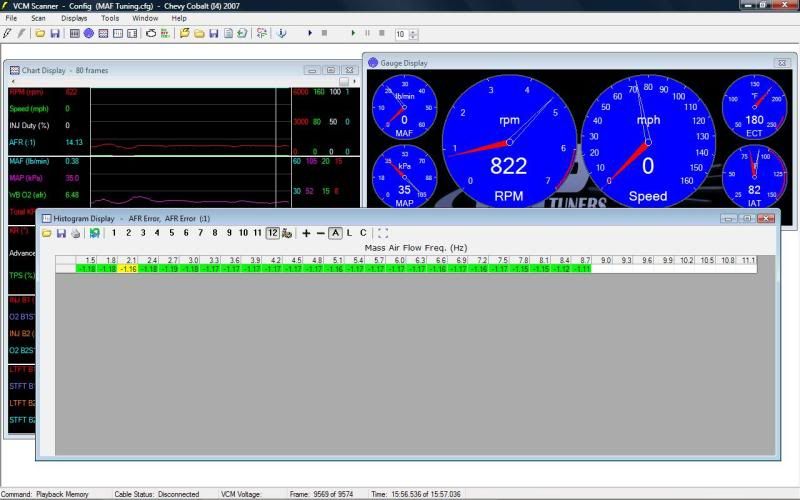
so i've been MAF tuning lately and seems to be going nowhere? Do i need to reset my fuel trims or something? I have a histo setup for AFR error against the maf and every time i go for a log i seem to be getting the same numbers (-1.17) pic is posted below. After I'm done logging i go into the editor and paste multiply % against the maf. Seems for the past 4 logs i keep getting the -1.17 in those cells every time. Is this just a matter of taking awhile to smooth out?

As for the histo, I'm using my ac switch to log AFR's. This is the equation I'm using for the histo: ((([PID.7101]/(5/8.5))+10)-(100*([USER.7101]-[SENS.121])/[SENS.121]))/(100*([USER.7101]-[SENS.121])/[SENS.121]).... Basically (Actual - Commanded) / (Commanded)

Reply
Old May 23, 2011 | 04:00 PM
  #16  
Red05SS/SC's Avatar
Senior Member
iTrader: (2)
 
Joined: 04-20-07
Posts: 719
Likes: 0
From: Levittown, PA
you need to turn off as many modifiers as possible. Disable DFCO and fuel trims. Also there is a good write up what to do to get as accurate as you can while fuel tuning. The fuel trims are making your AFR 14.7 while cruising and idling and that is why your afr error histo is reading so close to 0. When you disable all the modifiers it will take all that crap out and run on exactly what is commanded and thats when you make your changes.
Reply
Old May 23, 2011 | 05:18 PM
  #17  
SCcobaltSS's Avatar
Senior Member
iTrader: (2)
 
Joined: 11-28-06
Posts: 4,085
Likes: 2
From: Phoenix
I just turn off DFCO and turn off closed loop in the scanner instead of doing it through the tune.

OP your car needs to be at 0 STFT's and LTFT's while its running, that is basically how you know that the car is in open loop. Reset the trims every time.
Reply
Old May 23, 2011 | 05:32 PM
  #18  
thebucky84's Avatar
Thread Starter
Senior Member
iTrader: (4)
 
Joined: 09-12-07
Posts: 988
Likes: 0
From: Florida
where is the DFCO in the scanner? Been looking and cant find it. So just turn both those off, reset fuel trim, log, then edit tune?
Reply
Old May 23, 2011 | 05:58 PM
  #19  
SCcobaltSS's Avatar
Senior Member
iTrader: (2)
 
Joined: 11-28-06
Posts: 4,085
Likes: 2
From: Phoenix
Originally Posted by thebucky84
where is the DFCO in the scanner? Been looking and cant find it. So just turn both those off, reset fuel trim, log, then edit tune?
DFCO has to be tuned out. Sorry I wasnt clear. Under fueling DFCO put all temps and rpm to max.

Put in open loop through scanner, reset fuel trims, turn car on, log, correct tune with paste special %... repeat until within 1% or whatever you are comfortable with,
Reply
Old May 23, 2011 | 06:06 PM
  #20  
thebucky84's Avatar
Thread Starter
Senior Member
iTrader: (4)
 
Joined: 09-12-07
Posts: 988
Likes: 0
From: Florida
ah gotcha, so just set all those values to something you will never reach.. I will try that out tonight
Reply
Old May 23, 2011 | 06:33 PM
  #21  
SCcobaltSS's Avatar
Senior Member
iTrader: (2)
 
Joined: 11-28-06
Posts: 4,085
Likes: 2
From: Phoenix
Originally Posted by thebucky84
ah gotcha, so just set all those values to something you will never reach.. I will try that out tonight
yup..
Reply
Old May 23, 2011 | 06:40 PM
  #22  
thebucky84's Avatar
Thread Starter
Senior Member
iTrader: (4)
 
Joined: 09-12-07
Posts: 988
Likes: 0
From: Florida
cool, i'm gonna be heading out here soon. Cruising around with my buddy, i'll let you know how the logs come out. Thanks man!
Reply
Old May 24, 2011 | 01:04 AM
  #23  
thebucky84's Avatar
Thread Starter
Senior Member
iTrader: (4)
 
Joined: 09-12-07
Posts: 988
Likes: 0
From: Florida
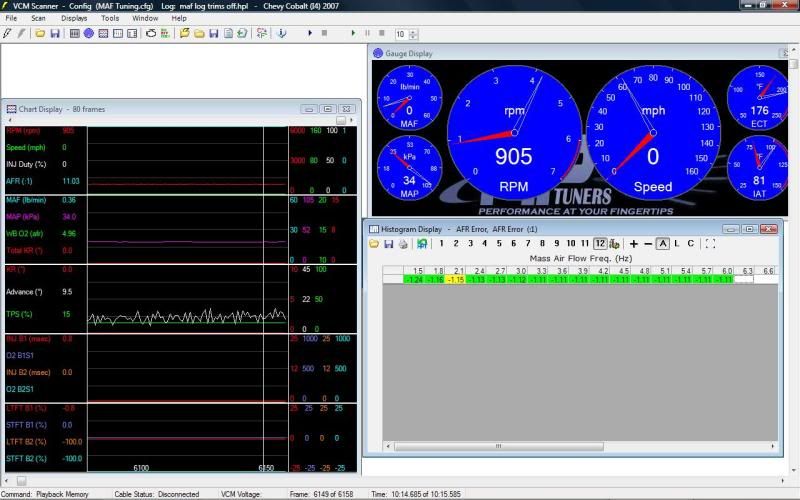
wow this is getting annoying i did exactly what you said.. here is what i got, also attached is my tune.. The whole time i was driving when i was on the throttle, whether 1% or whatever the afr pegged to 10..


DFCO disabled
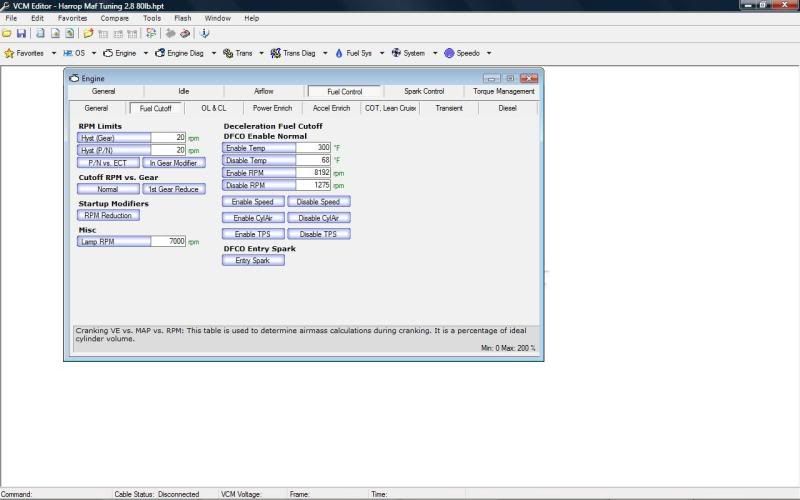


This is what i got
Reply
Old May 24, 2011 | 10:17 AM
  #24  
SCcobaltSS's Avatar
Senior Member
iTrader: (2)
 
Joined: 11-28-06
Posts: 4,085
Likes: 2
From: Phoenix
I have the new beta and this works but I set my AFR Error like this:

100*((USER.xxxx-14.7)/14.7)

USER.xxxx represents the custom AFR PID.

I could not get the built in AFR gauge to work...

Just be patient I couldnt get mine to work for months. haha
Reply
Old May 24, 2011 | 11:28 AM
  #25  
thebucky84's Avatar
Thread Starter
Senior Member
iTrader: (4)
 
Joined: 09-12-07
Posts: 988
Likes: 0
From: Florida
Where do I get the new beta? I've been looking and can't find it.
Reply


All times are GMT -4. The time now is 11:51 PM.