
Appearance Body Kits, Hoods, Wheels, Spoilers, Interiors

photoshop request

Thread Tools
 
Search this Thread
 
Old Mar 1, 2009 | 11:47 PM
  #1  
JINNER44's Avatar
Thread Starter
Member
 
Joined: 12-03-08
Posts: 399
Likes: 0
From: new jersey
photoshop request

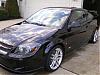
hey can someone photoshop my hood/grill/bumper/lip like this with gunmetal grey


except can you leave the ss emblem on the grill
\

anyone out there who can help. it doesnt have to be perfect

Last edited by JINNER44; Mar 1, 2009 at 11:47 PM. Reason: Automerged Doublepost
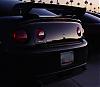
Reply
Old Mar 2, 2009 | 12:15 AM
  #2  
Prouty33's Avatar
Member
 
Joined: 02-12-08
Posts: 210
Likes: 0
From: MA
Gunmetal is hard to make, for me anyway lol... best I could do

Reply
Old Mar 2, 2009 | 12:17 AM
  #3  
wardzach2007's Avatar
Banned
 
Joined: 05-20-08
Posts: 8,580
Likes: 0
From: Usa
^^^How did you get the reflection to stay with the chop?
Reply
Old Mar 2, 2009 | 12:18 AM
  #4  
JINNER44's Avatar
Thread Starter
Member
 
Joined: 12-03-08
Posts: 399
Likes: 0
From: new jersey
thanks man. what do u think
Reply
Old Mar 2, 2009 | 12:20 AM
  #5  
wardzach2007's Avatar
Banned
 
Joined: 05-20-08
Posts: 8,580
Likes: 0
From: Usa

Custom carbon fiber would look tight.
Reply
Old Mar 2, 2009 | 12:22 AM
  #6  
JINNER44's Avatar
Thread Starter
Member
 
Joined: 12-03-08
Posts: 399
Likes: 0
From: new jersey
yea but that would probaly cost a shitload of money
Reply
Old Mar 2, 2009 | 12:26 AM
  #7  
wardzach2007's Avatar
Banned
 
Joined: 05-20-08
Posts: 8,580
Likes: 0
From: Usa
Originally Posted by JINNER44
yea but that would probaly cost a shitload of money
Look up impulseballer or something like that. He does custom REAL fiber jobs.

GIve him the chop and let him give you a quote. Plus you can trust him too.
Reply
Old Mar 2, 2009 | 12:41 AM
  #8  
JINNER44's Avatar
Thread Starter
Member
 
Joined: 12-03-08
Posts: 399
Likes: 0
From: new jersey
could u try to photoshop carbon fiber or no
Reply
Old Mar 2, 2009 | 12:46 AM
  #9  
wardzach2007's Avatar
Banned
 
Joined: 05-20-08
Posts: 8,580
Likes: 0
From: Usa
I would love to help you out bro.

I do have photoshop though, but im still in the process of learning it. All i can do is paint rims.
Reply
Old Mar 2, 2009 | 12:49 AM
  #10  
JINNER44's Avatar
Thread Starter
Member
 
Joined: 12-03-08
Posts: 399
Likes: 0
From: new jersey
hahah alright thanks anyways man
Reply
Old Mar 2, 2009 | 12:54 AM
  #11  
ls1fbody's Avatar
Haz l33t wheelz.
 
Joined: 09-14-07
Posts: 18,883
Likes: 3
From: Costa Mesa CA
for the hood it would be best to get a CF one and paint the black parts.
Reply
Old Mar 2, 2009 | 12:58 AM
  #12  
JINNER44's Avatar
Thread Starter
Member
 
Joined: 12-03-08
Posts: 399
Likes: 0
From: new jersey
yea i think this would all cost too much money. i could use that one performance stuff instead
Reply
Old Mar 2, 2009 | 01:38 AM
  #13  
elecblue06's Avatar
Senior Member
iTrader: (1)
 
Joined: 03-19-07
Posts: 14,901
Likes: 1
From: newburgh,ny


best i could do on short notice lol

Last edited by elecblue06; Mar 2, 2009 at 01:38 AM. Reason: Automerged Doublepost
Reply
Old Mar 2, 2009 | 01:40 AM
  #14  
JINNER44's Avatar
Thread Starter
Member
 
Joined: 12-03-08
Posts: 399
Likes: 0
From: new jersey
thanks. i tihnk it looks really cool. just too much money
Reply
Old Mar 2, 2009 | 01:43 AM
  #15  
wardzach2007's Avatar
Banned
 
Joined: 05-20-08
Posts: 8,580
Likes: 0
From: Usa
Or you could just paint the tc grill flat black
Reply
Old Mar 2, 2009 | 01:43 AM
  #16  
Prouty33's Avatar
Member
 
Joined: 02-12-08
Posts: 210
Likes: 0
From: MA
Originally Posted by wardzach2007
^^^How did you get the reflection to stay with the chop?
Just change the hue/saturation to get the colors that you want for a selection. Makes chops look 10000% better and gives you a better idea of what it really looks like (by keeping reflection/shading/etc...)
Reply
Old Mar 2, 2009 | 01:45 AM
  #17  
elecblue06's Avatar
Senior Member
iTrader: (1)
 
Joined: 03-19-07
Posts: 14,901
Likes: 1
From: newburgh,ny
Originally Posted by JINNER44
thanks. i tihnk it looks really cool. just too much money
yea it's be ALOT of money but it would definitely look like sex

Originally Posted by Prouty33
Just change the hue/saturation to get the colors that you want for a selection. Makes chops look 10000% better and gives you a better idea of what it really looks like (by keeping reflection/shading/etc...)
you do that and also cut the dark levels as well .. so that way it makes it more contrasty .. you look some details but it gives you a nice result usually especially when usually it as an effects modifier level

Last edited by elecblue06; Mar 2, 2009 at 01:45 AM. Reason: Automerged Doublepost
Reply
Old Mar 2, 2009 | 01:45 AM
  #18  
wardzach2007's Avatar
Banned
 
Joined: 05-20-08
Posts: 8,580
Likes: 0
From: Usa
Originally Posted by Prouty33
Just change the hue/saturation to get the colors that you want for a selection. Makes chops look 10000% better and gives you a better idea of what it really looks like (by keeping reflection/shading/etc...)
im a photoshop noob.

But where exactly do you change it?
Reply
Old Mar 2, 2009 | 01:56 AM
  #19  
Prouty33's Avatar
Member
 
Joined: 02-12-08
Posts: 210
Likes: 0
From: MA
The quick and easy way:

Make a selection, I prefer the pen tool zoomed in really close (400%+ if its a good picture). Once you have traced out what you want go to Image > Adjustments > Hue/saturation and play with the 3 bars til you get the color you're looking for

Edit: Gotta make a new layer with the selection, just CTRL+C, CTRL+V once you have made a selection
Reply
Old Mar 2, 2009 | 01:57 AM
  #20  
Wolf117's Avatar
Senior Member
 
Joined: 12-26-07
Posts: 1,515
Likes: 0
From: Tempe, Arizona
Originally Posted by wardzach2007
im a photoshop noob.

But where exactly do you change it?
lol image, adjustments
Reply
Old Mar 2, 2009 | 02:21 AM
  #21  
elecblue06's Avatar
Senior Member
iTrader: (1)
 
Joined: 03-19-07
Posts: 14,901
Likes: 1
From: newburgh,ny
Originally Posted by Prouty33
The quick and easy way:

Make a selection, I prefer the pen tool zoomed in really close (400%+ if its a good picture). Once you have traced out what you want go to Image > Adjustments > Hue/saturation and play with the 3 bars til you get the color you're looking for

Edit: Gotta make a new layer with the selection, just CTRL+C, CTRL+V once you have made a selection
Don't do that lol .. just ctrl + J will make a new layer from selection and it'll be in the right spot
Reply
Old Mar 2, 2009 | 10:24 AM
  #22  
Prouty33's Avatar
Member
 
Joined: 02-12-08
Posts: 210
Likes: 0
From: MA
Originally Posted by elecblue06
Don't do that lol .. just ctrl + J will make a new layer from selection and it'll be in the right spot
Does the exact same thing
Reply
Related Topics
Thread
Thread Starter
Forum
Replies
Last Post
ineedacobaltss
Parts
16
Nov 7, 2015 02:25 PM
jcobaltss
Parts
2
Oct 10, 2015 10:14 AM
09BlkCrusader
Parts
30
Sep 9, 2015 04:47 PM
MarcS
General Cobalt
42
Aug 5, 2005 12:57 AM


All times are GMT -4. The time now is 11:00 AM.