iTrader Walk-Through


Thread Starter
Original Hayden Fanatic
Platinum Member
Joined: 05-06-06
Posts: 33,169
Likes: 1
From: Dayton, O HI O
 iTrader Walk-Through
CobaltSS.net has recently introduced the iTrader transaction rating system to the forum. The following are some helpful tips on how to make use of the new system to better the site.
The information that will be covered in this walk-through:
* Viewing Users iTrader Detail
* Rating a Transaction
* Edit/Delete Feedback
* Reporting Malicious Feedback
Viewing Users iTrader Details:
To view detailed information about any users iTrader rating simply click their rating #:

And to view your own iTrader page go to: https://www.cobaltss.net/forums/itrader.php or click your own rating in any of your posts.
Rating a Transaction:
The systems interface is very easy to use & is similar to eBay's transaction rating system.
To leave feedback for a user simply go to the thread in which the transaction was advertised in and click the sellers iTrader rating.
At this time it might be a good idea to copy the thread link for later.
This link will bring you a detailed page of the users iTrader rating. From this page you can click the "Submit Feedback for Username"

On the next page you will be able to input detailed information about the transaction.

You will be able to select which party you are in the transaction (Buyer, Seller, Trade) and rate the transaction (Positive, Neutral, Negative).
A link to the thread from which the transaction took place will be required.
Once you have filled out all the information you can click the "Submit Reply" button to leave your feedback.
Please be sure all fields are populated & accurate because you will only have a very limited amount of time to edit your feedback.
Edit/Delete Feedback:
Once feedback has been given you will have only 5 minutes to make any changes to your reply.
To do so goto the user's iTrader page, and click the edit button:

This will bring you back to the feedback page where you can modify your feedback.
To delete feedback simply check the "Delete this Rating" box and click "Submit Reply"

Reviewing your Feedback:
Whenever someone leaves feedback on your page you will be notified via PM with a link to a page with detailed information on the review.

You should take this opportunity to leave feedback to for that user by clicking the "Submit Rating for This Deal" icon:

*You can also access this link by visiting your own iTrader profile here
Reporting Malicious Feedback:
If you should receive any malicious, false, or incorrect feedback via the iTrader system you can report it to the Moderator Staff.
Simply click the "Report Bad Rating" icon ( ) from your iTrader page.
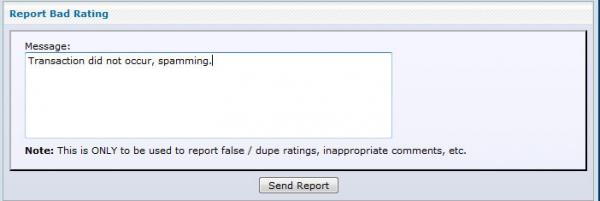
Please give as much detail as possible when reporting malicious feedback & we will make every effort to investigate and respond as quickly as possible.
I hope you find this walk-through helpful in navigating this new and exciting forum feature. Please feel free to post up any questions you may have about the iTrader system here.
Thanks,
REIGN SS
The information that will be covered in this walk-through:
* Viewing Users iTrader Detail
* Rating a Transaction
* Edit/Delete Feedback
* Reporting Malicious Feedback
Viewing Users iTrader Details:
To view detailed information about any users iTrader rating simply click their rating #:
And to view your own iTrader page go to: https://www.cobaltss.net/forums/itrader.php or click your own rating in any of your posts.
Rating a Transaction:
The systems interface is very easy to use & is similar to eBay's transaction rating system.
To leave feedback for a user simply go to the thread in which the transaction was advertised in and click the sellers iTrader rating.
At this time it might be a good idea to copy the thread link for later.
This link will bring you a detailed page of the users iTrader rating. From this page you can click the "Submit Feedback for Username"
On the next page you will be able to input detailed information about the transaction.
You will be able to select which party you are in the transaction (Buyer, Seller, Trade) and rate the transaction (Positive, Neutral, Negative).
A link to the thread from which the transaction took place will be required.
Once you have filled out all the information you can click the "Submit Reply" button to leave your feedback.
Please be sure all fields are populated & accurate because you will only have a very limited amount of time to edit your feedback.
Edit/Delete Feedback:
Once feedback has been given you will have only 5 minutes to make any changes to your reply.
To do so goto the user's iTrader page, and click the edit button:
This will bring you back to the feedback page where you can modify your feedback.
To delete feedback simply check the "Delete this Rating" box and click "Submit Reply"
Reviewing your Feedback:
Whenever someone leaves feedback on your page you will be notified via PM with a link to a page with detailed information on the review.
You should take this opportunity to leave feedback to for that user by clicking the "Submit Rating for This Deal" icon:
*You can also access this link by visiting your own iTrader profile here
Reporting Malicious Feedback:
If you should receive any malicious, false, or incorrect feedback via the iTrader system you can report it to the Moderator Staff.
Simply click the "Report Bad Rating" icon (
) from your iTrader page.Please give as much detail as possible when reporting malicious feedback & we will make every effort to investigate and respond as quickly as possible.
I hope you find this walk-through helpful in navigating this new and exciting forum feature. Please feel free to post up any questions you may have about the iTrader system here.
Thanks,
REIGN SS
Last edited by REIGN SS; Sep 1, 2010 at 10:01 PM.








you got it bud!
you mean you actually thought about something OTHER than the hot chicks thread??? i'm speechless.