


How to use USB input on radio besides iPod.


Senior Member
Joined: 02-11-09
Posts: 1,394
Likes: 2
From: Detroit, MI
Seeing how all Fords with SYNC now come with a USB port, I see no reason for other OEM's to skirt this issue. USB should be made standard in all cars now, IMHO.

Senior Member
Joined: 06-01-07
Posts: 1,524
Likes: 1
From: nowhere
My radio reads my flash drive perfectly fine, it's a 4GB. I've found that the way the files are sorted depends on how I transfer them onto the drive. They are sorted in the car in exactly the same order they are written to the drive on the computer. So if I want my files in a very specific order, I have to copy them onto the drive in that order. I do this when I reorganize my music, so that the files I listen to more often are at the top of the list so I don't have to scroll through so many files. I use ID3 tags as well and the radio reads them just fine. I just reloaded my flash drive this morning with all my music in one folder and the radio reads it all from start to finish, which is like 600+ files. The USB radio was the best thing I ever bought for my car (an 07), and every radio should have come with one from the start.

New Member
Joined: 07-28-09
Posts: 111
Likes: 1
From: the weeds
Hey all,
I have much the same question as the OP. I copied 5 mp3s onto my flash drive to test the usb port in my 09 ss and the radio screen read:
COULD NOT CONNECT.
USB CONNECTION NOT SUPPORTED.
Well-
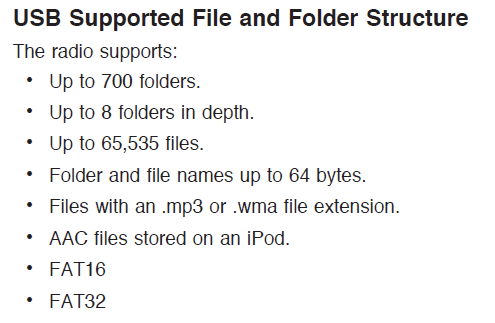
I plugged the flash drive back into my PC and the props say it's FAT. Gotta be FAT32 cuz it's a few years old, now, it's only 500mb. I think much cleaner to copy some music onto a flash drive than plugging in a player, but she no workee. I wanna buy a 8gb thumb drive, but want to know that it'll work, since I have no other use for another flash drive.
I copied the mp3s into the root of the flash drive; the drive has like 4 other folders on it with other file types- I don't know what else to say about the setup.
Any help?
Thanks in advance.
I have much the same question as the OP. I copied 5 mp3s onto my flash drive to test the usb port in my 09 ss and the radio screen read:
COULD NOT CONNECT.
USB CONNECTION NOT SUPPORTED.
Well-
I plugged the flash drive back into my PC and the props say it's FAT. Gotta be FAT32 cuz it's a few years old, now, it's only 500mb. I think much cleaner to copy some music onto a flash drive than plugging in a player, but she no workee. I wanna buy a 8gb thumb drive, but want to know that it'll work, since I have no other use for another flash drive.
I copied the mp3s into the root of the flash drive; the drive has like 4 other folders on it with other file types- I don't know what else to say about the setup.
Any help?
Thanks in advance.
Last edited by chevy2; Oct 22, 2009 at 01:53 AM.
Senior Member
Joined: 06-01-07
Posts: 1,524
Likes: 1
From: nowhere
Backup the other files on the drive if you need them, then reformat it. Put the music back on and see if it works, if not, reformat it again with FAT32 or whatever to see if that works. If it still doesn't then it's possible that it's too old to be supported by the USB port the radio has. My 4GB drive works fine so I'm gonna guess it's a formatting issue or it's not supported due to its age.
New Member
Joined: 07-28-09
Posts: 111
Likes: 1
From: the weeds
NCC-2000,
Thanks for the ideas, I'll reformat and see what happens.
[edit]
Not OK.
I converted the format to NTFS, got the same fuzzy answer as posted above.
Then reformatted the flash drive to FAT32 and recopied some mp3s onto it- the GM unit gave me the same answer.
I'm starting to think that on my player the USB port can't be used to play anything through it, no matter what I plug in, and THAT'S what
"USB CONNECTION NOT SUPPORTED" means.
I have a brand-new ACER pc with Windows Home Vista Premium (gag!) on it and the Acer could read and write the flash drive before and after converting and formatting.
I'm thinking this player is a scam.
Thanks for the ideas, I'll reformat and see what happens.
[edit]
Not OK.
I converted the format to NTFS, got the same fuzzy answer as posted above.
Then reformatted the flash drive to FAT32 and recopied some mp3s onto it- the GM unit gave me the same answer.
I'm starting to think that on my player the USB port can't be used to play anything through it, no matter what I plug in, and THAT'S what
"USB CONNECTION NOT SUPPORTED" means.
I have a brand-new ACER pc with Windows Home Vista Premium (gag!) on it and the Acer could read and write the flash drive before and after converting and formatting.
I'm thinking this player is a scam.
Last edited by chevy2; Oct 23, 2009 at 01:28 AM. Reason: Actions taken

i have a 09 silver stock cd player with usb port that i'm getting rid of. PM me if you want it and we can talk prices.
I tried hooking my 250gb hard drive up to my head unit and it recognized that something was hooked up, but i couldn't search through it on my head unit. gayyy
I tried hooking my 250gb hard drive up to my head unit and it recognized that something was hooked up, but i couldn't search through it on my head unit. gayyy
New Member
Joined: 07-28-09
Posts: 111
Likes: 1
From: the weeds
Thanks for the offer Chinelli. I'll pass; if I spend money on another unit, it won't be GM. I have no use for the CD player functionality or XM radio and I want something I can toss back at the seller if it doesn't work.

New Member
Joined: 08-09-09
Posts: 144
Likes: 0
From: Atlanta
My radio reads my flash drive perfectly fine, it's a 4GB. I've found that the way the files are sorted depends on how I transfer them onto the drive. They are sorted in the car in exactly the same order they are written to the drive on the computer. So if I want my files in a very specific order, I have to copy them onto the drive in that order. I do this when I reorganize my music, so that the files I listen to more often are at the top of the list so I don't have to scroll through so many files. I use ID3 tags as well and the radio reads them just fine. I just reloaded my flash drive this morning with all my music in one folder and the radio reads it all from start to finish, which is like 600+ files. The USB radio was the best thing I ever bought for my car (an 07), and every radio should have come with one from the start.
Personally I use iTunes AAC for my conversions, I think the high end sounds better.
So to get the best sound quality at a decent file size - Use AAC or Mp3 at 192kbits, constant bitrate.
Each song will be around 8-10MB or 20% of the size it used to be.
Last edited by mrfitz; Oct 23, 2009 at 07:52 PM. Reason: Automerged Doublepost

Bannned
Joined: 09-08-07
Posts: 8,743
Likes: 0
From: Kaneohe, HI
just took a vid of the usb in action.... just for this thread. im uploading it now
its formatted to FAT not FAT32
http://www.youtube.com/watch?v=vy8rOXPaydM
its formatted to FAT not FAT32
http://www.youtube.com/watch?v=vy8rOXPaydM
Last edited by ColeJJones; Oct 23, 2009 at 08:27 PM. Reason: Automerged Doublepost

New Member
Joined: 08-09-09
Posts: 144
Likes: 0
From: Atlanta
just took a vid of the usb in action.... just for this thread. im uploading it now
its formatted to FAT not FAT32
http://www.youtube.com/watch?v=vy8rOXPaydM
its formatted to FAT not FAT32
http://www.youtube.com/watch?v=vy8rOXPaydM
It switches right to it when you insert it just like the aux jack does too. Cool.
Cant wait to get an 09 Radio!

Senior Member
Joined: 02-09-09
Posts: 4,374
Likes: 5
From: Tejas
He forgot the pause, random (drive and folder), and repeat (all and single) buttons. They the middle ones you use for selecting favorites when in normal mode.
Also that whole row of buttons can be used to scroll up and down a list of songs if you've got a big list. How much each button does it is in the manual... don't remember them all.
Also that whole row of buttons can be used to scroll up and down a list of songs if you've got a big list. How much each button does it is in the manual... don't remember them all.

New Member
Joined: 03-07-06
Posts: 92
Likes: 0
From: Minneapolis, Minnesota
I have tried .mp3 and .wma files formated to FAT32 and NTFS on 1GB, 2GB and 16GB(microSD, class 6) thumb drives. Went to the dealer last night and they didn't know what to do. I'm at my wits end. All I ever get is "Searching for USB". I reformated and copied a single 320kbs file onto the 16GB last night without a folder and the same thing. I'm so pissed I paid for this option.
Senior Member
Joined: 02-11-09
Posts: 1,394
Likes: 2
From: Detroit, MI
I have tried .mp3 and .wma files formated to FAT32 and NTFS on 1GB, 2GB and 16GB(microSD, class 6) thumb drives. Went to the dealer last night and they didn't know what to do. I'm at my wits end. All I ever get is "Searching for USB". I reformated and copied a single 320kbs file onto the 16GB last night without a folder and the same thing. I'm so pissed I paid for this option.
Try to do a quick a format, 4096 byte allocation size, FAT32 (not NTFS). Always eject/safely remove the flash drives in Windows after you are done copying.
New Member
Joined: 03-07-06
Posts: 92
Likes: 0
From: Minneapolis, Minnesota
I have been formating with 4096 byte alocation size and FAT32. The only difference with what you suggest, is I have been doing the full format instead of the quick format. Took about 20 minutes to format the 16GB's last night. I wouldn't think the quick format would improve the issue?
Senior Member
Joined: 02-11-09
Posts: 1,394
Likes: 2
From: Detroit, MI
Just do the quick format. Flash drives and Solid State Drives don't need the full format, and in fact the full format reduces the life span of the drive.
After you copy your files over, use the EJECT or SAFELY REMOVE feature of XP/Vista before you pull the drive.
Try different MP3 files.
If that doesn't work, see if at least you can play MP3s on a CD.
The dealer may have to replace your radio system under warranty.
After you copy your files over, use the EJECT or SAFELY REMOVE feature of XP/Vista before you pull the drive.
Try different MP3 files.
If that doesn't work, see if at least you can play MP3s on a CD.
The dealer may have to replace your radio system under warranty.
New Member
Joined: 03-07-06
Posts: 92
Likes: 0
From: Minneapolis, Minnesota
Thanks for the help! I'll try the quick format and the EJECT or SAFELY REMOVE feature tonight. I tried the same drive on another car at the dealership and the same message came up, so I have a feeling it has something to do with what I am doing. The odds of two cars with dead USB ports...?
Senior Member
Joined: 02-11-09
Posts: 1,394
Likes: 2
From: Detroit, MI
Always use the Windows remove feature for flash drives / external HD's. If you just yank the drive, you can corrupt the data. In Vista/7, just right-clock on the drive in MY COMPUTER, then select EJECT.
In XP, you have to use the "Safely Remove Hardware" icon in the system tray by the clock.
In XP, you have to use the "Safely Remove Hardware" icon in the system tray by the clock.
Senior Member
Joined: 06-01-07
Posts: 1,524
Likes: 1
From: nowhere
While it's always good nature to follow all instructions to the T, I've never once used the safely remove thing on my computer any time I load up my flash drives or memory cards, and not once have I had any issues with them. Now I'm not saying it isn't possible to screw things up doing that, but in reality the chances are slim.
If you've tried every possible way to format and the drive you're using still doesn't work, maybe you should consider getting a different one. It's a long shot but perhaps your drive and the USB radios just don't like each other for whatever reason and won't work together? Do you know anyone that has flash drives you can try out? What about hooking up an iPod and seeing if that works with it? Best to see if you can narrow things down and pinpoint exactly what doesn't work, the drives or the USB port.
If you've tried every possible way to format and the drive you're using still doesn't work, maybe you should consider getting a different one. It's a long shot but perhaps your drive and the USB radios just don't like each other for whatever reason and won't work together? Do you know anyone that has flash drives you can try out? What about hooking up an iPod and seeing if that works with it? Best to see if you can narrow things down and pinpoint exactly what doesn't work, the drives or the USB port.
New Member
Joined: 07-28-09
Posts: 111
Likes: 1
From: the weeds
rolsen55,
See my aggravated posts on page 2 of this thread if you want. I tried 2 different thumb sticks, the second one I bought new at the time I was posting just to try to get something working. I tried every format trick on both thumb drives- I formatted them both everywhich way 'til they were dizzy- NOTHING worked. I gave up on the thumb drive thing.
I just bought a Sony NWZ-E344 8Gb player (~$68). Copied some mp3s onto the Sony, plugged the Sony into the 'balt, the headunit screen lit up with "Oh look- music" and it plays everything. I didn't test it long enough to see if the shuffle feature on the head menu works, but it's progress.
My suggestion is bite the bullet and use a player. The Sony I got says pc sys reqs Windows XP with a SP (forget which one) or Vista (no media editions, though)- I have Vista.
Good luck either way.
See my aggravated posts on page 2 of this thread if you want. I tried 2 different thumb sticks, the second one I bought new at the time I was posting just to try to get something working. I tried every format trick on both thumb drives- I formatted them both everywhich way 'til they were dizzy- NOTHING worked. I gave up on the thumb drive thing.
I just bought a Sony NWZ-E344 8Gb player (~$68). Copied some mp3s onto the Sony, plugged the Sony into the 'balt, the headunit screen lit up with "Oh look- music" and it plays everything. I didn't test it long enough to see if the shuffle feature on the head menu works, but it's progress.
My suggestion is bite the bullet and use a player. The Sony I got says pc sys reqs Windows XP with a SP (forget which one) or Vista (no media editions, though)- I have Vista.
Good luck either way.
Senior Member
Joined: 02-11-09
Posts: 1,394
Likes: 2
From: Detroit, MI
Out of curiosity, what thumb drives are you buying/using?
I've tried everything from an inexpensive GFM 2GB that I bought at my grocery store, to 4GB OCZ and 4GB Patriot XT drives - it works fine. I haven't tried my iPod, which I should...
I've tried everything from an inexpensive GFM 2GB that I bought at my grocery store, to 4GB OCZ and 4GB Patriot XT drives - it works fine. I haven't tried my iPod, which I should...
New Member
Joined: 03-07-06
Posts: 92
Likes: 0
From: Minneapolis, Minnesota
My original post said I have tried many drives, 4 different ones to be exact. An old 256MB, a 1 year old 1GB, a 1 year old 2GB and my latest purchase was a 16GB class 6 MicroSD card. None of them have worked. Last night I tried a quick format on the 16GB at 4096 with FAT32 and used the eject feature. I put just one .mp3 on it and guess what? &^#@%$* thing didn't work. I'm done! I'm going into the dealer and demanding my $100 +tax back and I'll put it towards a real stereo.