


Other/Misc: How to format USB drive on a MAC for radio compatibility


Thread Starter
New Member
Joined: 08-09-09
Posts: 144
Likes: 0
From: Atlanta
 How to format USB drive on a MAC for radio compatibility
Hey Everyone.
If you're using a Mac, here is the proper way to format a USB drive, so that it is readable by both your computer and your car radio.
First what you are going to do, is open disk utility.
(HD>APPLICATIONS>UTILITIES)
(you can access the utilities folder by hitting SHFT+CMD+U while in Finder)
Once disk utility is open, follow these steps to format disk then partition disk:
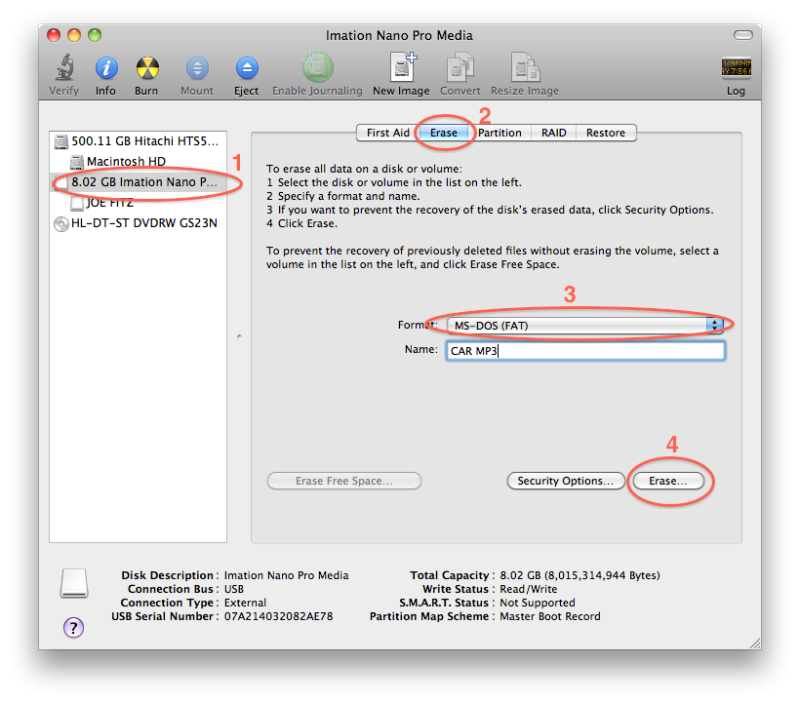
Format Disk
1. Select your usb drive in the left section of the window
2. Select the Erase Tab
3. Change the format to MS DOS (FAT)
4. Erase Disk
FIGURE A
Partition Disk
(Figure B)
1. Select your usb drive in the left section of the window
2. Select the Partition Tab
3. Select "1 Partition" in the volume scheme dropdown
4. Change the format to MS DOS (FAT)
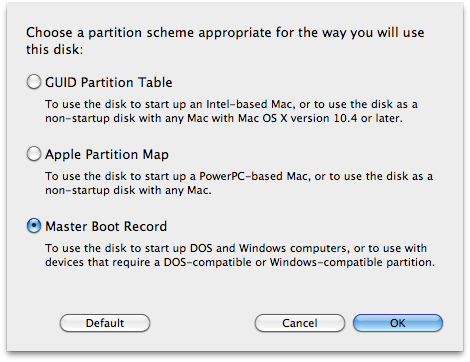
(Figures B and C)
5. Click on the Options button, and change the partition scheme to Master Boot Record, and click "OK"
(Notice that this option reads "...or to use with devices that require a DOS-compatible or Windows-compatible partition.")
(Figure B)
6. Click Apply!
FIGURE B
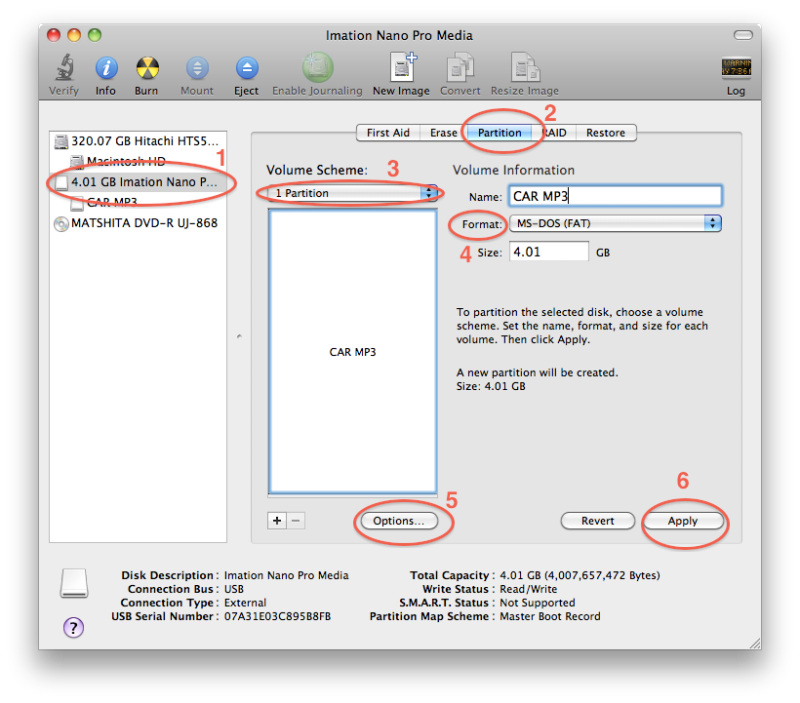
FIGURE C
And there you have it! Now you have a USB drive that is compatible with both your Mac computer and your Cobalt Radio with USB port!
If you're using a Mac, here is the proper way to format a USB drive, so that it is readable by both your computer and your car radio.
First what you are going to do, is open disk utility.
(HD>APPLICATIONS>UTILITIES)
(you can access the utilities folder by hitting SHFT+CMD+U while in Finder)
Once disk utility is open, follow these steps to format disk then partition disk:
Format Disk
1. Select your usb drive in the left section of the window
2. Select the Erase Tab
3. Change the format to MS DOS (FAT)
4. Erase Disk
FIGURE A
Partition Disk
(Figure B)
1. Select your usb drive in the left section of the window
2. Select the Partition Tab
3. Select "1 Partition" in the volume scheme dropdown
4. Change the format to MS DOS (FAT)
(Figures B and C)
5. Click on the Options button, and change the partition scheme to Master Boot Record, and click "OK"
(Notice that this option reads "...or to use with devices that require a DOS-compatible or Windows-compatible partition.")
(Figure B)
6. Click Apply!
FIGURE B
FIGURE C
And there you have it! Now you have a USB drive that is compatible with both your Mac computer and your Cobalt Radio with USB port!

Thread
Thread Starter
Forum
Replies
Last Post
agentirons
Electronics, Audio, and Video
2
Oct 16, 2015 02:11 AM
importkiller
Problems/Service/Maintenance
11
Sep 30, 2015 07:18 PM