


Official 2009 Photography Thread


Banned
Joined: 05-20-08
Posts: 8,580
Likes: 0
From: Usa
Speaking of photography specifically the image is nice but be mindful of background distractions unless intentional and if it is intentional get more on the frame .ie. the corner of the building.
So the editing from what you see is better?
You have to be careful using a flash because it's really easy to blow out the pictures and make everything too bright. Normally what I do is change the shutter speed so that it stays open longer (this is where the tripod comes in to play. If I can I generally leave my ISO at 200 and adjust the shutter speed and f-stop to meet my needs. The only thing I raise the ISo up for is if I'm trying to get a picture of something moving in dim light. One thing you want to be aware of is when you have a lower f-stop your DOF is going to be very shallow. In good lighting you want to keep that in mind because it can make a big difference in your pictures (Low f-stop shallow DOF...high f-stop deep DOF). However, in bad lighting you can pretty much throw that out the window.
BTW does your camera have a light meter built into it? I know my D60 has one on the LCD screen on the back and when you look through the view finder. This should help you when making your decisions about shutter speed, f-stop, and ISO settings...
BTW here's one of the latest pictures I took of my dog.
[IMG]http://i142.photobucket.com/albums/r87/vaffanculo403/Dogs/DSC_0724.jpg[IMG]
BTW does your camera have a light meter built into it? I know my D60 has one on the LCD screen on the back and when you look through the view finder. This should help you when making your decisions about shutter speed, f-stop, and ISO settings...
BTW here's one of the latest pictures I took of my dog.
[IMG]http://i142.photobucket.com/albums/r87/vaffanculo403/Dogs/DSC_0724.jpg[IMG]

Last edited by wardzach2007; Dec 9, 2009 at 12:42 AM. Reason: Automerged Doublepost

Senior Member
Joined: 09-14-05
Posts: 6,697
Likes: 0
From: Phx, AZ
Yeah, it was intentional. Never thought about putting the building in there. Pretty soon when the weather gets nicer, I'll get out of my yard and find better places.
So the editing from what you see is better?
Awesome advice guys. I'm getting a little bit better at this. Yeah, my Canon XS has the built in meter. It helps so I don't have to take my eye of the pic to change the ISO/F-Stop/Aperture.
So the editing from what you see is better?
Awesome advice guys. I'm getting a little bit better at this. Yeah, my Canon XS has the built in meter. It helps so I don't have to take my eye of the pic to change the ISO/F-Stop/Aperture.
Banned
Joined: 05-20-08
Posts: 8,580
Likes: 0
From: Usa
Last night outside I tried to take pictures of cars, but they came out all blurry. I tried "sport" mode and still nothing. I know I need to get it to some kind of manual mode to make the subject still.
Would I go to AV mode and increase the F-stop?
Senior Member
Joined: 09-14-05
Posts: 6,697
Likes: 0
From: Phx, AZ
Remember when in low light depth of field rules fly out the window almost completely. The reason for this is because the light coming in is so low and focused. As a result you want to use the smallest f-stop number you can.

Senior Member
Joined: 09-14-05
Posts: 6,697
Likes: 0
From: Phx, AZ
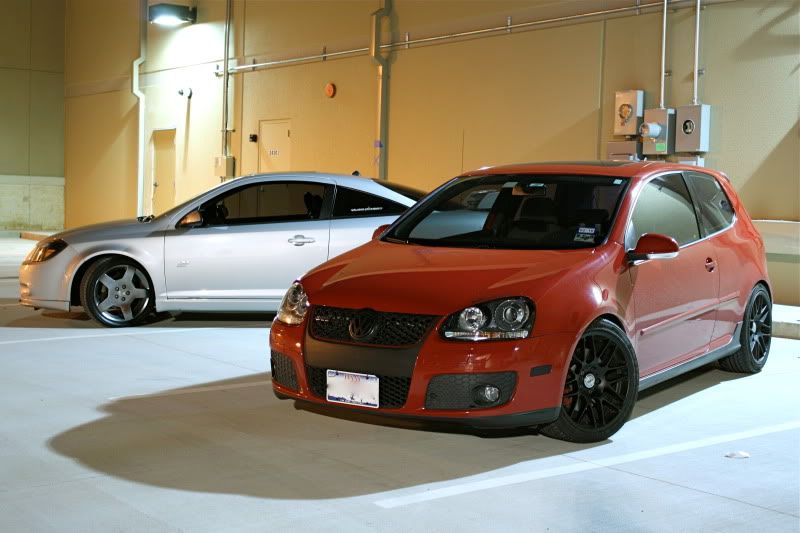
what did the original look like? This seems very good though seems kinda bright?!? however, I would have made the VW much closer to the camera to give the image more dimension it seems kinda flat.
Banned
Joined: 05-20-08
Posts: 8,580
Likes: 0
From: Usa
Agreed that it looks flat.
I can just crop it right?
I'll post the original when I get off of work.

Senior Member
Joined: 09-14-05
Posts: 6,697
Likes: 0
From: Phx, AZ

Senior Member
Joined: 09-14-05
Posts: 6,697
Likes: 0
From: Phx, AZ
Av mode is Aperture Value and Tv is Time Value. They are more commonly used now as A for Aperture or S for Shutter. At the track it will depend on what your shooting since the conditions may be variable. Standard rules still apply, for static images Av and for motion Tv.
For shooting a car in motion, Tv mode, you need to keep a few things in mind. If you want the car in the image make sure you get the entire car including wheels. If you want to get a close shot make sure you get the face and hands. A blurred car in motion is nice as long as everything else is in focus so 1/60 or less can work for this. If you wanna pan with the car to get the background blurry use 1/60-1/250. If you wanna stop the background while panning 1/250-1/1000. And of course above 1/1000 will stop everything.
All of this will of course depend on focal length and distance to the car so the values may be higher or lower depending on the variables but they are generally the standard for normal viewing distances and zooms. If it's at night boost your ISO as high as you can to try and reach the values as best as possible. Remember slightly under exposed is still ok cus you can post process most images up to 50% brighter than normal before noise destroys the image or color becomes washed.
Eric
For shooting a car in motion, Tv mode, you need to keep a few things in mind. If you want the car in the image make sure you get the entire car including wheels. If you want to get a close shot make sure you get the face and hands. A blurred car in motion is nice as long as everything else is in focus so 1/60 or less can work for this. If you wanna pan with the car to get the background blurry use 1/60-1/250. If you wanna stop the background while panning 1/250-1/1000. And of course above 1/1000 will stop everything.
All of this will of course depend on focal length and distance to the car so the values may be higher or lower depending on the variables but they are generally the standard for normal viewing distances and zooms. If it's at night boost your ISO as high as you can to try and reach the values as best as possible. Remember slightly under exposed is still ok cus you can post process most images up to 50% brighter than normal before noise destroys the image or color becomes washed.
Eric

Senior Member
Joined: 05-14-09
Posts: 7,171
Likes: 0
From: Bronx
Oh I do but when you change lenses dirt gets in, it's a giant pain in the ass. I do everything, do it downwards, don't do it in wind, but it just always gets dirty and the last two times I returned it to Best Buy for warranty covered cleaning they sent it back dirty.
Banned
Joined: 05-20-08
Posts: 8,580
Likes: 0
From: Usa
Oh I do but when you change lenses dirt gets in, it's a giant pain in the ass. I do everything, do it downwards, don't do it in wind, but it just always gets dirty and the last two times I returned it to Best Buy for warranty covered cleaning they sent it back dirty.
Av mode is Aperture Value and Tv is Time Value. They are more commonly used now as A for Aperture or S for Shutter. At the track it will depend on what your shooting since the conditions may be variable. Standard rules still apply, for static images Av and for motion Tv.
For shooting a car in motion, Tv mode, you need to keep a few things in mind. If you want the car in the image make sure you get the entire car including wheels. If you want to get a close shot make sure you get the face and hands. A blurred car in motion is nice as long as everything else is in focus so 1/60 or less can work for this. If you wanna pan with the car to get the background blurry use 1/60-1/250. If you wanna stop the background while panning 1/250-1/1000. And of course above 1/1000 will stop everything.
All of this will of course depend on focal length and distance to the car so the values may be higher or lower depending on the variables but they are generally the standard for normal viewing distances and zooms. If it's at night boost your ISO as high as you can to try and reach the values as best as possible. Remember slightly under exposed is still ok cus you can post process most images up to 50% brighter than normal before noise destroys the image or color becomes washed.
Eric
For shooting a car in motion, Tv mode, you need to keep a few things in mind. If you want the car in the image make sure you get the entire car including wheels. If you want to get a close shot make sure you get the face and hands. A blurred car in motion is nice as long as everything else is in focus so 1/60 or less can work for this. If you wanna pan with the car to get the background blurry use 1/60-1/250. If you wanna stop the background while panning 1/250-1/1000. And of course above 1/1000 will stop everything.
All of this will of course depend on focal length and distance to the car so the values may be higher or lower depending on the variables but they are generally the standard for normal viewing distances and zooms. If it's at night boost your ISO as high as you can to try and reach the values as best as possible. Remember slightly under exposed is still ok cus you can post process most images up to 50% brighter than normal before noise destroys the image or color becomes washed.
Eric
Very awesome help. Is there a way to tell what aperture on a pic was used and all the info from the image itself on the computer?
I know you can view the image size and dimensions, but can people tell what you used at the time of pic from their own computers?
Last edited by wardzach2007; Dec 10, 2009 at 03:47 PM. Reason: Automerged Doublepost
Senior Member
Joined: 09-14-05
Posts: 6,697
Likes: 0
From: Phx, AZ
Dang, that sucks. At least you have the warranty. My Cannon has the sensor cleaning where it vibrates the lens every time you shut it off.
Cool thanks Eric.
Very awesome help. Is there a way to tell what aperture on a pic was used and all the info from the image itself on the computer?
I know you can view the image size and dimensions, but can people tell what you used at the time of pic from their own computers?
Cool thanks Eric.
Very awesome help. Is there a way to tell what aperture on a pic was used and all the info from the image itself on the computer?
I know you can view the image size and dimensions, but can people tell what you used at the time of pic from their own computers?
Senior Member
Joined: 05-14-09
Posts: 7,171
Likes: 0
From: Bronx


Banned
Joined: 05-20-08
Posts: 8,580
Likes: 0
From: Usa


Platinum Member
Joined: 03-16-07
Posts: 2,883
Likes: 0
From: Saskatchewan, Canada
THat looks pretty good. Everything looks pretty clear and framed well. I think like you said, a lower ISO might make it a little better.
Here is a picture I took in the summer but just got around to putting it up on my flickr. Let me know what you think.

Here is a picture I took in the summer but just got around to putting it up on my flickr. Let me know what you think.
Senior Member
Joined: 09-14-05
Posts: 6,697
Likes: 0
From: Phx, AZ
THat looks pretty good. Everything looks pretty clear and framed well. I think like you said, a lower ISO might make it a little better.
Here is a picture I took in the summer but just got around to putting it up on my flickr. Let me know what you think.
[img]https://farm3.static.flickr.com/2564/4174547343_02fb19913f_o.jpg[img]
Here is a picture I took in the summer but just got around to putting it up on my flickr. Let me know what you think.
[img]https://farm3.static.flickr.com/2564/4174547343_02fb19913f_o.jpg[img]
Last edited by OniMirage; Dec 14, 2009 at 02:15 PM. Reason: Automerged Doublepost