


View Poll Results: Black SS Wing?


Voters: 36. You may not vote on this poll
Need Your Opinion (V2)


Thread Starter
Senior Member
Joined: 06-14-06
Posts: 2,535
Likes: 0
From: Nashville, TN
Need Your Opinion (V2)
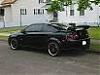
Ok so many of you allready read my post about putting a black SS Wing on my Silver Balt. Well I Choped pics of a balt with the same kit as mine with the black SS Wing. So now lets get your opinions. Please look at the photos before you vote and remember I actually have black rims 
Thanks


Thanks


Senior Member
Joined: 11-26-06
Posts: 791
Likes: 0
From: Cincinnati, OH
yea, if you had more black bits to it, it would look okay, but i think that if you had the upper half of the car painted black, that would look even better.
or you paint the wing flat black and put a black hood on it, you could make it like the old mopar cars!
http://blog.vehiclevoice.com/1970Cha...r_blog_pic.jpg
or you paint the wing flat black and put a black hood on it, you could make it like the old mopar cars!
http://blog.vehiclevoice.com/1970Cha...r_blog_pic.jpg



Senior Member
Joined: 12-18-06
Posts: 2,693
Likes: 1
From: Wisconsin
not a big fan, unless you do more to it to put it all into a scheme or something like that. You know like dark window tint, a black vynal along the side (not to ricey) and black accents. Then i think it would be show car material

Senior Member
Joined: 01-09-07
Posts: 563
Likes: 1
From: Jupiter, Fl
As long as you incorporate more black accents, the black wing will look good. As stated before, paint the top half of the car black with a black hood. Better yet, go with a carbon fiber wing and a carbon fiber hood with the top half of the car painted black. But just putting the black wing on makes it look like your had to replace your wing and you have not had it painted yet. 


Senior Member
Joined: 07-06-06
Posts: 1,589
Likes: 0
From: Indiana
It def needs some other black to pull it off. I voted no but if you accent it well it will look ok. But I took my SS wing off because it was to big. Def need window tint at least 20% or less, black painted headlights and some other kind of black accenting on the body.
Also it would be interesting to see what the body kit would look like if painted black. Maybe you could chop that in to see.
Also it would be interesting to see what the body kit would look like if painted black. Maybe you could chop that in to see.

Senior Member
Joined: 06-11-06
Posts: 536
Likes: 0
From: Chesterfield, MI
I'd say no to the all-black spoiler.
Just a tip on Photoshopping.. to do blacks, use the Brightness/Contrast keys instead of darkening it. Brightness/Contrast will keep the shine to it whereas the CTRL+U just makes it dark and flat looking. Just a tip, that's all. Keep on chuckin'.
Just a tip on Photoshopping.. to do blacks, use the Brightness/Contrast keys instead of darkening it. Brightness/Contrast will keep the shine to it whereas the CTRL+U just makes it dark and flat looking. Just a tip, that's all. Keep on chuckin'.
Thread Starter
Senior Member
Joined: 06-14-06
Posts: 2,535
Likes: 0
From: Nashville, TN
yea, Im better with photoshop but I used Paint.net because Im at work. So not as many options and didnt want to figure it all out. So I just overlayed and turned the opacity down.
Thanks though
Thanks though


Senior Member
Joined: 11-07-06
Posts: 2,077
Likes: 0
From: Nowheresville
I think it would look good if you do a silver center piece and silver inserts on the towers! but it looks good all black too!
Something Like this...I think would look cool!

Something Like this...I think would look cool!
Last edited by 07LaserBlueSS; Mar 13, 2007 at 02:53 PM.


Senior Member
Joined: 11-07-06
Posts: 2,077
Likes: 0
From: Nowheresville


Thread
Thread Starter
Forum
Replies
Last Post
importkiller
Problems/Service/Maintenance
11
Sep 30, 2015 07:18 PM
reybalt
2.0L LNF Performance Tech
2
Sep 22, 2015 06:35 PM