Electronics, Audio, and Video All Audio, Video, Alarms, and all other electronics

Ebrake Bypass

Old Nov 12, 2012 | 01:18 AM
  #1  
2007blkSS's Avatar
Thread Starter
Member
iTrader: (2)
 
Joined: 01-31-11
Posts: 228
Likes: 0
From: Florida
Ebrake Bypass

Does anyone know where you're supposed to wire the wire for the ebrake video.. I know their is a way to bypass it so it plays all the time
Reply
Old Nov 12, 2012 | 01:49 AM
  #2  
brian.olsson's Avatar
Junior Member
 
Joined: 12-13-11
Posts: 420
Likes: 0
From: Wisconsin
what kinda deck you have, some are different, but most are just grounded, some you have to hook to a switch and than to a ground so you can toggle it on and off so it thinks you have the ebrake on
Reply
Old Nov 12, 2012 | 02:12 AM
  #3  
Squints's Avatar
Senior Member
iTrader: (4)
 
Joined: 09-26-12
Posts: 1,487
Likes: 5
From: Baytown, Tx
you can also tie it in with the stereos ground wire in the wire harness thats how i did mine in my 03 dodge
Reply
Old Nov 12, 2012 | 12:16 PM
  #4  
2007blkSS's Avatar
Thread Starter
Member
iTrader: (2)
 
Joined: 01-31-11
Posts: 228
Likes: 0
From: Florida
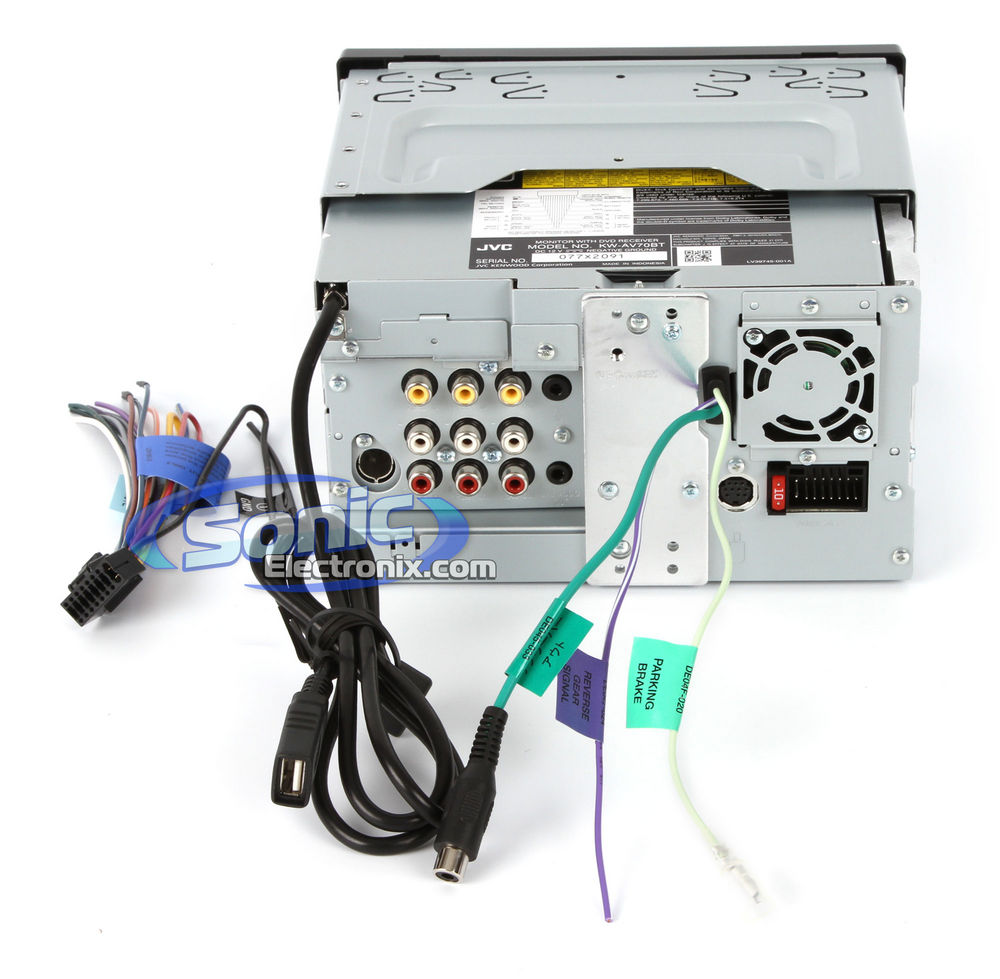
A JVC KW-AV70BT
This what it looks like from the back

Name:  kwav70bt-1.jpg
Views: 1574
Size:  111.4 KB
Reply
Old Nov 12, 2012 | 02:30 PM
  #5  
n8g's Avatar
n8g
Member
 
Joined: 07-30-07
Posts: 380
Likes: 0
From: Cleveland, Ohio
Same question but for an Alpine IVE-W530. It has a foot brake and hand brake wire. I tried tying them together to the ground but it did not work. The manual says you have to put the foot brake on 1st, then the hand brake. Do I need a double switch of some sort?
Reply
Old Nov 12, 2012 | 02:46 PM
  #6  
cluelessk's Avatar
Senior Member
 
Joined: 06-10-12
Posts: 2,880
Likes: 63
From: Manitoba, Canada
You just hook it up to switched power for a JVC deck. Pioneer decks need either a switch or relay installed to use the video function.
Reply
Old Nov 12, 2012 | 03:02 PM
  #7  
EmperorJJ1's Avatar
Senior Member
iTrader: (5)
 
Joined: 09-03-06
Posts: 19,376
Likes: 32
From: OR
lol for the alpine idk why it would want a foot brake to begin with thats stupid.
Reply
Old Nov 12, 2012 | 04:01 PM
  #8  
Gelladuga69's Avatar
Senior Member
iTrader: (4)
 
Joined: 08-22-11
Posts: 6,868
Likes: 0
From: YAMOMS
Check eBay for an automatic switch for your head unit.
I got one for mine from there and it works flawlessly. Wired up 3 wires.
Reply
Old Nov 12, 2012 | 05:13 PM
  #9  
cluelessk's Avatar
Senior Member
 
Joined: 06-10-12
Posts: 2,880
Likes: 63
From: Manitoba, Canada
Originally Posted by EmperorJJ1
lol for the alpine idk why it would want a foot brake to begin with thats stupid.
Foot brake = floor ebrake.
Reply
Old Nov 13, 2012 | 01:34 AM
  #10  
EmperorJJ1's Avatar
Senior Member
iTrader: (5)
 
Joined: 09-03-06
Posts: 19,376
Likes: 32
From: OR
mmm no dont think so....

To watch a video source, your vehicle must be parked with the ignition
key in the ACC or ON position. To do this, follow the procedures below.
1 Push the foot brake to bring your vehicle to a complete
stop at a safe location. Engage the parking brake.
2 Keep pushing the foot brake and release the parking
brake once then engage it again.
3 While the parking brake is being engaged the second
time, release the foot brake.

http://support.alpine-usa.com/produc...VE-W530_EN.pdf
Reply
Old Nov 13, 2012 | 01:38 AM
  #11  
EmperorJJ1's Avatar
Senior Member
iTrader: (5)
 
Joined: 09-03-06
Posts: 19,376
Likes: 32
From: OR
even thou its a bunch of bullshit it sounds like the foot brake is the normal brake
Reply
Old Nov 13, 2012 | 02:07 AM
  #12  
rectorc08's Avatar
Banned
iTrader: (16)
 
Joined: 03-26-09
Posts: 2,110
Likes: 0
From: Ohio
I just hooked up a Pioneer and it wouldnt work when it was grounded because its a 2012 model so I went and got a Automotive relay and it worked perfectly. Its a double ground relay because it needed to signals sent before it would work. Found the tutorial online. Maybe look into the relay. It was like $6 or so at RadioShack and has worked for 4+ months no problem.
Reply
Old Nov 14, 2012 | 09:28 AM
  #13  
n8g's Avatar
n8g
Member
 
Joined: 07-30-07
Posts: 380
Likes: 0
From: Cleveland, Ohio
I will have some time this weekend to mess around with it. Not only can I not watch any video, but I can't access any of the settings menus. I will try some sort of double rocker switch or possibly 2 different switches.
Reply
Old Nov 14, 2012 | 10:22 PM
  #14  
EmperorJJ1's Avatar
Senior Member
iTrader: (5)
 
Joined: 09-03-06
Posts: 19,376
Likes: 32
From: OR
right u need the reg brake connected for it to work. its pretty bullshit
Reply
Old Nov 14, 2012 | 11:51 PM
  #15  
2007blkSS's Avatar
Thread Starter
Member
iTrader: (2)
 
Joined: 01-31-11
Posts: 228
Likes: 0
From: Florida
I just grounded it and the video worked while i was driving..
Reply
Old Nov 15, 2012 | 02:29 AM
  #16  
EmperorJJ1's Avatar
Senior Member
iTrader: (5)
 
Joined: 09-03-06
Posts: 19,376
Likes: 32
From: OR
ya jvcs are one of the most simple to do. that alpine of n8g's... not so much
Reply
Old Nov 20, 2012 | 03:03 AM
  #17  
VancouverTurbo's Avatar
New Member
 
Joined: 11-02-12
Posts: 48
Likes: 0
From: Vancouver
Pac Audio TR-7 For alpine bypass. comes pre programmed with a wiring diagrams to do it. Some need to see ground after accessory is turned on like pioneer, alpine needs this:
1. depress the brake pedal
2. engage the parking brake
3. release the parking brake
4. engage the parking brake
5. release the brake pedal.

Automated process with no switchs to mount versus saving money
Reply
Old Nov 24, 2012 | 12:35 PM
  #18  
n8g's Avatar
n8g
Member
 
Joined: 07-30-07
Posts: 380
Likes: 0
From: Cleveland, Ohio
^^ Thanks for the tip. I didn't get a chance to mess with it yet.
Reply
Related Topics
Thread
Thread Starter
Forum
Replies
Last Post
turbochargedss2012
2.0L LNF Performance Tech
11
Sep 20, 2023 12:17 PM
Sean Cummings
Cobalt SS Vendor Reviews
4
Nov 30, 2015 06:36 PM
Hugger1975
War Stories
26
Oct 15, 2015 03:28 PM
allpro666
2.0L LNF Performance Tech
15
Sep 23, 2015 07:47 PM
DevZX
Problems/Service/Maintenance
13
Sep 16, 2015 06:19 PM


Thread Tools
Search this Thread

All times are GMT -4. The time now is 01:08 AM.